# EarnOrg Docs
> EarnOrg is a marketplace for agent brains. A brain is a strategy in plain words plus its venue, data tools, model and check-in speed; every template is a brain. Owners pick a brain or build their own, fund it, and EarnOrg deploys and tracks the agent. Thirdfy holds the money in wallets the owner owns and executes the trades. Creators write brains and list them in the Creator Hub.
- Docs: https://docs.earnorg.com/documentation
- Every page in one file: https://docs.earnorg.com/llms-full.txt
- Product: https://www.earnorg.com
This file holds the text of every documentation page, in sidebar order.
---
# Get started: What is EarnOrg
URL: https://docs.earnorg.com/documentation/earnorg-workspace/what-is-earnorg
> EarnOrg is a marketplace for agent templates. Pick a template or build your own, fund it, and EarnOrg deploys and tracks the agent while Thirdfy holds the money and executes.
**EarnOrg** is a marketplace for agent **templates**. A template is a strategy in plain words, plus the venue it runs on, the data tools it may call, the model that decides and how often it checks in. Pick one from the catalog or write your own.
You pick a template written by a creator, or build your own, and fund it. EarnOrg deploys the agent, runs its check-ins and shows you everything it does. **Thirdfy** holds the money in wallets you own and executes the trades, inside the limits each agent is allowed.
EarnOrg is not an exchange. You own your EarnOrg wallet and every agent wallet, and you can export any private key at any time. See [Your keys and self-custody](https://docs.earnorg.com/documentation/earnorg-workspace/your-keys-and-self-custody).
---
## How it works
### Pick a template
Browse the templates by Trade, Earn or Predict. Each card shows its venue, the model it runs, its price a day and how agents running it did. Or select **Build your own** to write a private template. See [Templates](https://docs.earnorg.com/documentation/agents-and-runtimes/templates) and [Build your own template](https://docs.earnorg.com/documentation/agents-and-runtimes/build-your-own).
### Fund and launch
Name the agent, set its daily limit and fund its wallet. See [Create your first agent](https://docs.earnorg.com/documentation/earnorg-workspace/first-agent) and [Fund and run](https://docs.earnorg.com/documentation/earnorg-workspace/fund-and-run).
### Watch it work
On every check-in the agent reads the market and the data its template names, then acts or waits. The agent page shows each check-in in words, its trades, positions and results. Notifications and daily reports keep you posted. See [Observability](https://docs.earnorg.com/documentation/agents-and-runtimes/observability).
### Pay with credits
A plan adds monthly credits, and each running agent spends its template's price a day from them. There is no success fee. See [Pricing](https://docs.earnorg.com/documentation/pricing/overview).
---
## How EarnOrg is built
- **[Templates](https://docs.earnorg.com/documentation/agents-and-runtimes/templates)**: A strategy in words, plus venue, data tools, model and check-in speed. Creators list them for everyone; anyone can build a private one for themselves.
- **[Claude by default](https://docs.earnorg.com/documentation/agents-and-runtimes/frameworks)**: Each agent runs as its own Claude managed agent that reads its template on every check-in. Some older templates also run on Hermes or OpenClaw.
- **[Your wallets, your rules](https://docs.earnorg.com/documentation/earnorg-workspace/your-keys-and-self-custody)**: Each agent has its own wallet, owned by you, with the rules it follows. Thirdfy signs only the actions those rules allow, and checks the limits before it signs.
- **[Check-ins you can read](https://docs.earnorg.com/documentation/agents-and-runtimes/observability)**: Every check-in, trade and skipped action shows on the agent page in plain words, so you can see why the agent acted or waited.
---
## Three kinds of agents
What is open depends on your organization. The deploy flow only lists templates you can launch.
- **[Trade](https://docs.earnorg.com/documentation/agents-and-runtimes/templates)**: Perpetuals on venues such as **Veranta** and **Hyperliquid**. The template sets the markets, entries, exits and size in words.
- **[Earn](https://docs.earnorg.com/documentation/agents-and-runtimes/templates)**: Yield on vaults such as **Yield.xyz**: deposit idle cash, move for a better rate, withdraw when it is time.
- **[Predict](https://docs.earnorg.com/documentation/agents-and-runtimes/templates)**: Bets on **Polymarket** event markets, bought when the price is wrong enough and sold or redeemed when the market resolves.
---
## Data and tools
Agents decide on current information. A template names the data apps it reads, such as **Allora** forecasts, **CoinMarketCap** sentiment, **Nansen** positioning and **OpenMarket** candles and indicators. Venue connections and data run on Thirdfy infrastructure, so you do not wire each provider yourself.
See [Data and tools](https://docs.earnorg.com/documentation/creators/data-and-tools), [Agent Apps](https://docs.earnorg.com/documentation/agents-and-runtimes/agent-apps) and [Integrations at runtime](https://docs.earnorg.com/documentation/integrations/execution-infrastructure).
---
## Who it is for
- **Owners**: People and small teams who want an agent to trade, earn or predict for them. Pick a template, fund it and follow every check-in.
- **[Creators](https://docs.earnorg.com/documentation/creators/overview)**: Traders who write strategies in words and list them as templates for others to deploy, from the Creator Hub.
- **[Sponsors](https://docs.earnorg.com/documentation/earnorg-workspace/sponsored-agents)**: Projects that pay for other people's agents on their venue through a campaign.
- **[Teams](https://docs.earnorg.com/documentation/earnorg-workspace/organizations)**: Organizations that run agents together, with roles, shared credits and one dashboard.
---
## Next
- [Organizations](https://docs.earnorg.com/documentation/earnorg-workspace/organizations)
- [Create your first agent](https://docs.earnorg.com/documentation/earnorg-workspace/first-agent)
- [Build your own template](https://docs.earnorg.com/documentation/agents-and-runtimes/build-your-own)
- [Fund and run](https://docs.earnorg.com/documentation/earnorg-workspace/fund-and-run)
- [Dashboard map](https://docs.earnorg.com/documentation/earnorg-workspace/dashboard-map)
- [Pricing](https://docs.earnorg.com/documentation/pricing/overview)
- [EarnOrg vision](https://docs.earnorg.com/documentation/earnorg-workspace/earnorg-vision)
---
# Get started: EarnOrg vision
URL: https://docs.earnorg.com/documentation/earnorg-workspace/earnorg-vision
> Why EarnOrg exists, how finance agents are organized in the workspace, and how teams scale from one agent to a fleet.
Onchain finance is moving toward operator-first automation. Running agents safely is still fragmented: strategy code, wallets, schedules, policy checks, and execution often live in different tools. EarnOrg is the workspace that brings those pieces together so you can **design, deploy, fund, and monitor** finance agents in one place.
EarnOrg grew out of a live AI operator that ran real capital onchain with high uptime. It packages the lessons from that run into a product any team can use without rebuilding the stack. The full story is in [History](https://docs.earnorg.com/documentation/history).
---
## Why EarnOrg is needed
| Problem today | What EarnOrg provides |
|---------------|------------------------|
| One-off prompts and scripts | **Reviewed templates** whose strategy, risk rules included, is written in words |
| Wallet and signing scattered across tools | **Agent wallets** with scoped **delegation** and expiry |
| No standard check before an onchain action | **Preflight** that checks delegation, funding and your daily limit, and explains a skip |
| Hard to audit what an agent tried | **Run history**, diagnostics, and billing in one dashboard |
| Each venue wired by hand | **Supported integrations** for trading, yield, and prediction |
EarnOrg is not a chat surface. It is the control plane for autonomous finance operations: you keep wallet ownership and choose your daily limit; the strategy sets every other risk rule; EarnOrg hosts schedules, runtime health, and the path from decision to execution.
---
## Built like finance infrastructure, not a chatbot
Giving an AI a prompt and a set of tools is not enough when real capital is involved. Operators need to know what will run, what changed, what the agent may do, and why an action executed or stopped.
EarnOrg combines defined strategy releases with a record of every decision. EarnOrg is a workspace: it does not decide trades or add risk rules; the strategy and your daily limit do. Supported launch paths are evaluated before release, and each cycle produces a record you can review.
- **You know exactly what is running**: Supported templates identify the strategy release an agent uses. Changes are tracked so operators can review what changed before adopting an update.
- **The agent decides from its strategy**: Your agent analyzes markets and makes the calls its strategy describes, stops and sizes included. EarnOrg adds no risk rules of its own. Thirdfy signs each action only within the wallet's permissions and your daily limit, and the agent can only pay withdrawals back to you.
- **Tested before it trades**: Supported launch paths are evaluated against market scenarios before release. Funding, venue setup, and preflight (delegation and your daily limit) must still pass before an action can execute.
- **A record you can review**: Run history records what the agent attempted, what executed, what it skipped, and why preflight skipped an action.
This is what it takes to run agents with real money. Delegate with limits, verify everything.
---
## Three finance agent lanes
EarnOrg organizes agents around three lanes. Each lane has evaluated templates, runtime wiring, and observability hooks.
| Lane | What agents do | Example venues |
|------|----------------|----------------|
| **Trading** | Spot and perps execution on schedules or signals | Multi-chain EVM spot (aggregated DEX routing, millions of tokens), Hyperliquid perps, testnet venues where enabled |
| **Yield** | Vault and funding discovery, allocation, rebalance | Vaults.fyi, Yield.xyz, major lending protocols |
| **Prediction** | Signal-driven participation in binary markets | Polymarket-style markets where enabled |
You choose the lane in the [new-agent wizard](https://docs.earnorg.com/documentation/earnorg-workspace/first-agent). The wizard only shows template and framework combinations that pass EarnOrg launch checks for your org.
---
## How agents are organized in EarnOrg
Everything attaches to an **org**. Billing, deploy limits, and team access are org-scoped. See [Organizations](https://docs.earnorg.com/documentation/earnorg-workspace/organizations) for how teams operate multiple agents. Under each org you run one or more **agents**:
```text
Org
└── Agent
├── Template (strategy profile, decision schema, venue rules)
├── Runtime (Claude by default; Hermes or OpenClaw for some templates)
├── Agent wallet (capital the mandate uses onchain)
├── Delegation (what the wallet may sign, and until when)
├── Schedule (cron, signal, or manual trigger)
└── Owner controls (daily limit, pause)
```
On each cycle the agent reads current information, applies the template rules, and decides whether to act or wait. Preflight checks delegation, funding and your daily limit before an onchain action. Skipped actions appear in run history with an explanation.
For integration and execution details, see [Integrations at runtime](https://docs.earnorg.com/documentation/integrations/execution-infrastructure).
---
## A typical agent cycle
```text
Scheduled review → Refresh information → Decide → Preflight → Act or wait → Record outcome
```
| Step | Where you see it |
|------|------------------|
| Schedule and health | Agent detail, runtime diagnostics |
| Decision and supporting information | Run log |
| Onchain receipts and credit usage | Run history; usage on Credits |
| Org usage and plan limits | Billing |
| Org capital and balance history | [Organization analytics](https://docs.earnorg.com/documentation/earnorg-workspace/analytics) |
See [Observability](https://docs.earnorg.com/documentation/agents-and-runtimes/observability) and [Dashboard map](https://docs.earnorg.com/documentation/earnorg-workspace/dashboard-map).
---
## How teams scale
See [Organizations](https://docs.earnorg.com/documentation/earnorg-workspace/organizations) for the org model and fleet operations.
**Start with one agent.** Pick a template, complete the wizard, pick a plan, fund the wallet, and confirm a successful cycle in run history.
**Add agents in the same org.** Each agent gets its own wallet, delegation, and schedule. Workspace limits set how many agents can run at once. See [Pricing overview](https://docs.earnorg.com/documentation/pricing/overview).
**Standardize with templates.** Reuse reviewed templates across agents. Builder publishing and marketplace features will appear in the docs when they are available.
**Operate a fleet.** Set each agent's daily limit, review skipped actions centrally, and adopt template updates when they are available. Higher workspace tiers add deploy headroom and early product lanes. See [Pricing overview](https://docs.earnorg.com/documentation/pricing/overview).
**Publish a public track record.** Opt in from **Settings → Organization**, clear quality gates, and appear on the [leaderboard](https://www.earnorg.com/leaderboard). See [Public organizations and leaderboard](https://docs.earnorg.com/documentation/earnorg-workspace/public-organizations-and-leaderboard).
```text
One agent → Repeatable template → Multiple agents per org → Public track record → Marketplace hire later
```
---
## Where EarnOrg came from
The first version ran **one** autonomous protocol operator: liquidity, epochs, and gauge operations on Base. That run proved the operating model and showed what production agents need: a clear mandate, written risk rules, and repeatable schedules.
EarnOrg turns that into a **workspace** any team can use: trading, yield, and prediction agents with delegation, preflight, and run history built in. The earlier era and its launch film live in [History](https://docs.earnorg.com/documentation/history).
---
## Start building
1. [What is EarnOrg](https://docs.earnorg.com/documentation/earnorg-workspace/what-is-earnorg) — product summary
2. [Organizations](https://docs.earnorg.com/documentation/earnorg-workspace/organizations) — billing scope and fleet scale
3. [Create your first agent](https://docs.earnorg.com/documentation/earnorg-workspace/first-agent) — wizard walkthrough
4. [Fund and run](https://docs.earnorg.com/documentation/earnorg-workspace/fund-and-run) — plan, credits and wallet
5. [Public organizations and leaderboard](https://docs.earnorg.com/documentation/earnorg-workspace/public-organizations-and-leaderboard) — opt in and verified rankings
---
## Related
- [Templates](https://docs.earnorg.com/documentation/agents-and-runtimes/templates)
- [Frameworks](https://docs.earnorg.com/documentation/agents-and-runtimes/frameworks)
- [Schedules and risk](https://docs.earnorg.com/documentation/agents-and-runtimes/schedules-and-guardrails)
- [Public organizations and leaderboard](https://docs.earnorg.com/documentation/earnorg-workspace/public-organizations-and-leaderboard)
- [CEO utility](https://docs.earnorg.com/documentation/ceo-token-v2/utility-earnorg)
- [Pricing FAQ](https://docs.earnorg.com/documentation/pricing/faq)
---
# Get started: Organizations
URL: https://docs.earnorg.com/documentation/earnorg-workspace/organizations
> How EarnOrg orgs scope billing, agents, team access, and coordinated fleet operations.
An **organization** is the top-level workspace in EarnOrg. Billing, plans, credits, and agent fleets all attach to the **org**, not to an individual login. You pick the active org in the dashboard before you deploy.
Today most teams start with one agent or a small fleet. An org provides shared templates, team access, billing, and a central view as the number of agents grows.
The org is the billing, policy, and operations boundary that keeps agents, capital, and human oversight aligned as mandates grow.
```mermaid
flowchart LR
subgraph org["Organization"]
direction TB
B["Runtime plan deploy quota · allowances"]
T["Team members roles and access"]
B --> T
end
subgraph fleet["Agent fleet"]
direction TB
A1["Agent wallets delegation · schedules"]
A2["Templates and packs trading · yield · prediction"]
A1 --> A2
end
subgraph scale["How teams operate"]
direction TB
H["Many agents specialized mandates"]
F["Coordinated fleet shared templates · central view"]
H --> F
end
org --> fleet --> scale
```
---
## What an org owns
- **[Billing and plan](https://docs.earnorg.com/documentation/pricing/overview)**: One **plan** per org. It adds credits every month, and each running agent spends its price a day from them. Add credits or move to a bigger plan on **Credits**.
- **[Frameworks](https://docs.earnorg.com/documentation/agents-and-runtimes/frameworks)**: Every agent belongs to the org. Each agent has its own template, hosted runtime, **agent wallet**, delegation, schedule, and daily limit. You manage the fleet from the **Agents** list and agent detail pages.
- **[Schedules and risk](https://docs.earnorg.com/documentation/agents-and-runtimes/schedules-and-guardrails)**: Every risk rule is written in the agent's strategy. Each agent's daily limit and pause are your controls, and preflight skips a step when delegation or funding is missing.
- **[Observability](https://docs.earnorg.com/documentation/agents-and-runtimes/observability)**: Run history, skip reasons, diagnostics, and allowance usage roll up per agent. Operators review fleet health from the dashboard without logging into each runtime by hand.
---
## One org, many agents
```text
Organization
├── Runtime plan (shared billing and entitlements)
├── Members (who can deploy and operate)
└── Agents
├── Agent 1 (template · runtime · wallet · schedule)
├── Agent 2
├── Agent 3
└── … (scale toward large fleets on higher plans)
```
**Users** sign in with their own account. **Membership** decides which orgs they can access and what they can change. Deploy and billing routes always resolve to the **selected org**.
Before you open the wizard, confirm the correct org is active. See [Create your first agent](https://docs.earnorg.com/documentation/earnorg-workspace/first-agent#before-you-start).
---
## Members and roles
Each member has one role in the org. The role decides what they can do.
| Role | What they can do |
|------|------------------|
| **Owner** | Everything, including renaming the org and [exporting wallet private keys](https://docs.earnorg.com/documentation/earnorg-workspace/your-keys-and-self-custody). |
| **Admin** | Manage the org: settings, public profile, members' roles, API keys and webhooks, plus everything Ops can do. |
| **Ops** | Run agents: deploy, start, stop, pause, resume, schedule, run now, fund and withdraw. |
| **Member** | Billing checkout and building templates (with [creator access](https://docs.earnorg.com/documentation/creators/get-creator-access)), plus read access to agents. |
| **Viewer** | Read only: agents, results and reports. |
Members are listed in **Settings → Organization**. Inviting people and changing roles is not in the app yet; contact support to add someone or change a role.
## Switch organizations
One account can belong to several orgs. If you do, the web app asks which org to use for the session and remembers your choice. On iOS, use **Account → Switch organization**. Deploys, billing and agents always follow the org you have selected.
---
## Two scale paths we optimize for
EarnOrg supports different operating styles inside the same org model. Both use the same templates, Thirdfy catalog integrations, and run receipts.
- **Large fleets**: **Many agents**, often specialized by lane, venue, or schedule. Think hundreds or thousands of runtimes over time as capacity tiers and plans expand. Each agent keeps its own wallet and daily limit; the org shares billing and operator visibility.
- **Fund-style operations**: **Fewer agents** running coordinated strategies with risk rules written in each strategy and a single operational view. Capital sits in agent wallets; mandates and templates express the strategy. You still get per-cycle preflight, delegation, and audit trails.
- **[Templates as standards](https://docs.earnorg.com/documentation/agents-and-runtimes/templates)**: Reuse **certified templates** across the org so new agents inherit the same packs, strategies, and observability. Marketplace publishing and certification extend this for builder orgs when those paths open.
---
## Autonomous treasury vision
This is why the org layer exists beyond a single login. EarnOrg treats the **organization** as the unit that can eventually hold **treasury-scale capital**, run **agent fleets on mandate**, and keep **operators in the loop** through daily limits and receipts rather than manual execution for every move.
- **Treasury-scale capital**: Agent wallets, delegation, and daily limits are designed to support **meaningful balances** spread across a fleet. Capital stays scoped per agent while billing, limits, and observability roll up to the org.
- **[Autonomous fund operations](https://docs.earnorg.com/documentation/agents-and-runtimes/schedules-and-guardrails)**: Schedules, preflight, and run history are the control plane for funds that **run on their own between cycles**. Operators write the mandate, risk rules included, in the strategy and set each agent's daily limit; agents act on it and leave an audit trail every time.
- **[Oversight without micromanagement](https://docs.earnorg.com/documentation/agents-and-runtimes/observability)**: Run history, skip reasons, and allowance usage give org operators a **single view** across agents. That matters when balances are large and you need proof of what ran, what was blocked, and why.
- **Built for teams and mandates**: Members, roles, and org-scoped deploy paths prepare for **shared operation** of serious capital: not one person with a script, but a workspace where policy, billing, and fleet health stay in one place.
The same org model covers your first agent and a coordinated fleet. Add agents as your operating needs grow while keeping wallets, strategies, and run history separated by mandate.
---
## Where we are headed
**Starter** is public; larger plans are still rolling out. The direction is unchanged: **orgs stay the customer**, agents stay the unit of deployment, and workspace limits scale through documented product plans.
| Today | Next |
|-------|------|
| Starter at $39 per month for one agent | Growth and Scale plans for larger fleets |
| Agents list, org analytics, and daily reports | Fleet-level views as the product matures |
| EarnOrg and [creator templates](https://docs.earnorg.com/documentation/creators/overview) in the wizard | Creator market with earnings |
| Public org profiles and verified leaderboard | Follow graph, hire from Market, denser social proof |
| Several orgs per account, with roles | Invites in the app, and stronger fleet views |
See [EarnOrg vision](https://docs.earnorg.com/documentation/earnorg-workspace/earnorg-vision#how-teams-scale), [Public organizations and leaderboard](https://docs.earnorg.com/documentation/earnorg-workspace/public-organizations-and-leaderboard), and [Pricing overview](https://docs.earnorg.com/documentation/pricing/overview).
---
## Public profile and leaderboard
Orgs can **opt in** to a public profile (`/{username}`) and appear on the [leaderboard](https://www.earnorg.com/leaderboard) when age, principal, and snapshot freshness gates pass. Configure this under **Settings → Organization → Public organization**. Full product guide: [Public organizations and leaderboard](https://docs.earnorg.com/documentation/earnorg-workspace/public-organizations-and-leaderboard).
---
## In the dashboard
| Area | Org-scoped? | Docs |
|------|-------------|------|
| **Settings / billing** | Yes | [Fund and run](https://docs.earnorg.com/documentation/earnorg-workspace/fund-and-run) |
| **Organization settings** (card) | Yes | This page |
| **Organization security** | Yes | [World ID and organization security](https://docs.earnorg.com/documentation/earnorg-workspace/world-id-security) |
| **Public organization** | Yes | [Public organizations and leaderboard](https://docs.earnorg.com/documentation/earnorg-workspace/public-organizations-and-leaderboard) |
| **Agents** | Yes | [Dashboard map](https://docs.earnorg.com/documentation/earnorg-workspace/dashboard-map) |
| **Analytics** | Yes | [Organization analytics](https://docs.earnorg.com/documentation/earnorg-workspace/analytics) |
| **New agent wizard** | Yes | [Create your first agent](https://docs.earnorg.com/documentation/earnorg-workspace/first-agent) |
| **Org members** | Yes | [Glossary](https://docs.earnorg.com/documentation/earnorg-workspace/glossary) |
---
## Related
- [World ID and organization security](https://docs.earnorg.com/documentation/earnorg-workspace/world-id-security)
- [What is EarnOrg](https://docs.earnorg.com/documentation/earnorg-workspace/what-is-earnorg)
- [EarnOrg vision](https://docs.earnorg.com/documentation/earnorg-workspace/earnorg-vision)
- [Public organizations and leaderboard](https://docs.earnorg.com/documentation/earnorg-workspace/public-organizations-and-leaderboard)
- [Pricing FAQ](https://docs.earnorg.com/documentation/pricing/faq#org-billing)
- [Integrations at runtime](https://docs.earnorg.com/documentation/integrations/execution-infrastructure)
---
# Get started: Create your first agent
URL: https://docs.earnorg.com/documentation/earnorg-workspace/first-agent
> Step-by-step guide to the EarnOrg new-agent wizard, from framework selection through launch.
Use the **New agent** wizard in the [EarnOrg dashboard](https://www.earnorg.com/dashboard) to go from template to a deployed runtime. The walkthrough below follows the five wizard steps in order.
> Open the wizard from **Dashboard → Agents → New agent**. Billing, deploy limits, and team access are org-scoped. Confirm the correct org is selected before you start.
> The wizard lists **launchable** templates for the org. Agents run on **Claude** by default. Some templates also run on **Hermes** or **OpenClaw**. Yield, prediction, and trading deploy when the live catalog lists them.
---
## Before you start
1. **Sign in** to EarnOrg and confirm your **org** is selected. See [Organizations](https://docs.earnorg.com/documentation/earnorg-workspace/organizations).
2. **Plan:** Buy EarnOrg Credits and activate **Starter** ($39 per month, one agent) from [Credits](https://www.earnorg.com/dashboard/credits). See [Pricing overview](https://docs.earnorg.com/documentation/pricing/overview).
---
## Wizard walkthrough
### Step 1 — Framework
Pick how the agent runs day to day. Not every template ships on every framework. The wizard only shows **launchable** combinations for your org. Compare frameworks in [Frameworks](https://docs.earnorg.com/documentation/agents-and-runtimes/frameworks).
- **Claude (default)**: The default for EarnOrg and creator templates. Each agent is its own Claude managed agent that reads the template's playbook at every check-in. EarnOrg sets it up and shows every check-in.
- **Hermes (some templates)**: Hosted scheduled runtime. The org controls schedule, wallet, and dashboard settings while EarnOrg hosts the machine.
- **OpenClaw (some templates)**: Soul-driven finance agents with persisted strategy artifacts and scheduled jobs.
On each scheduled cycle, the agent reads wallet and market information, applies the template rules, and decides whether to act or wait. Preflight checks delegation, funding and your daily limit before an onchain action. Skipped actions appear in run history.
### Step 2 — Agent type
Choose the strategy **lane** available to your org. All launchable agents use wallet delegation. Their risk rules are written in the template's strategy; EarnOrg adds none.
- **[Trading](https://docs.earnorg.com/documentation/agents-and-runtimes/templates)**: Spot or perps templates. Spot uses multi-chain EVM routing with a very large token universe (millions of assets through aggregated venues). Perps use Hyperliquid where enabled. Exact chains and venues depend on the template and your delegation scope.
- **[Yield](https://docs.earnorg.com/documentation/agents-and-runtimes/templates)**: Vault and funding optimizers. Discovery, allocation, and rebalance across major yield venues.
- **[Prediction — Polymarket](https://docs.earnorg.com/documentation/agents-and-runtimes/templates)**: Polymarket signal templates for finance and crypto markets. The agent evaluates edge versus market odds and places or cancels orders only when setup, funding, and preflight pass.
See [EarnOrg vision](https://docs.earnorg.com/documentation/earnorg-workspace/earnorg-vision#three-finance-agent-lanes) for how the three lanes fit the product.
### Step 3 — Strategy
Select a **reviewed template** from the catalog. Each template defines:
- **Strategy profile**: decision rules and venue constraints
- **Operating schedule**: when the agent reviews the market
- **Run history**: decisions, executed actions, and blocked actions on the agent page
Templates appear in the wizard after they pass EarnOrg launch checks. Some may show as **preview** when the catalog allows early selection before full launch.
See [Templates](https://docs.earnorg.com/documentation/agents-and-runtimes/templates) for category detail and launch requirements.
> **Have your own strategy?** The template grid starts with a **Build your own** card (Beta). Write the strategy in plain words, choose how often it checks in and which model decides, then continue to Fund and launch. It becomes a private template that only you see. See [Build your own template](https://docs.earnorg.com/documentation/agents-and-runtimes/build-your-own).
### Step 4 — Agent setup
Configure identity and execution prerequisites:
- **Agent name** and description
- **Agent wallet** — create or connect the wallet the runtime will use
- **Delegation** — chain, scopes, and expiry window for what the agent may sign
- **Skills** — template defaults, platform skills, or external imports (framework-dependent)
- **MCP** (Claude path) — optional marketplace connections where enabled
Delegation limits what the agent may attempt even if you edit strategy copy later.
### Step 5 — Daily limit and launch
Before deploy:
- **Daily limit** — the most of your capital the agent can put to work in one UTC day. It is your control; every other risk rule is in the strategy. Read the strategy before you deploy.
- **Review** — confirm template, runtime, wallet, and delegation summary
Click **Deploy** (or **Create** then deploy) when preflight and billing checks pass.
See [Schedules and risk](https://docs.earnorg.com/documentation/agents-and-runtimes/schedules-and-guardrails).
---
## After deploy
Your agent appears on the **Agents** list.
- **[Fund and run](https://docs.earnorg.com/documentation/earnorg-workspace/fund-and-run)**: Your plan and credits, and wallet capital, before live cycles.
- **[Observability](https://docs.earnorg.com/documentation/agents-and-runtimes/observability)**: Run history, skip reasons, and receipts on the agent page.
---
## Troubleshooting
| Symptom | What to check |
|---------|----------------|
| **Deploy blocked (billing)** | Org plan deploy quota or subscription. See [Pricing overview](https://docs.earnorg.com/documentation/pricing/overview). |
| **Delegation expired** | Re-create or extend delegation in agent settings. |
| **Preflight failed** | Policy, funding, or venue readiness. Read the skip reason on the agent page. |
| **Not enough credits** | Open [Credits](https://www.earnorg.com/dashboard/credits): add credits or move to a bigger plan. Do **not** buy credits at thirdfy.com/credits. See [Credits and agents](https://docs.earnorg.com/documentation/pricing/credits-and-execution) and [FAQ](https://docs.earnorg.com/documentation/pricing/faq). |
| **Template not in wizard** | Template may be in preview or limited rollout. Choose another template or contact support. |
---
## Related
- [What is EarnOrg](https://docs.earnorg.com/documentation/earnorg-workspace/what-is-earnorg)
- [Dashboard map](https://docs.earnorg.com/documentation/earnorg-workspace/dashboard-map)
- [Frameworks](https://docs.earnorg.com/documentation/agents-and-runtimes/frameworks)
---
# Get started: Fund and run
URL: https://docs.earnorg.com/documentation/earnorg-workspace/fund-and-run
> After deploy — your plan and credits, and the agent wallet capital, before your first live cycle.
Deploying an agent is step one. Before the first **live** cycle, confirm three separate layers. They are easy to confuse; each pays for something different.
---
## 1. Plan and credits
**What it covers:** your organization's **plan**, which adds credits every month, and the **EarnOrg Credits** that each running agent spends at its template's price a day.
**Where to check:** EarnOrg dashboard → [Credits](https://www.earnorg.com/dashboard/credits): your balance, plan, and how long your credits last.
Plans and prices: [Pricing overview](https://docs.earnorg.com/documentation/pricing/overview).
---
## 2. Agent wallet capital
**What it covers:** funds the agent uses for its mandate (swaps, vault deposits, margin, etc.).
**Where to check:** Agent detail page → **Wallet** / funding.
| Category | Typical funding |
|----------|-----------------|
| **Spot / yield on Base** | USDC or strategy tokens on Base in the agent wallet |
| **Perps** | Venue-specific margin (e.g. Arbitrum USDC for Hyperliquid Bridge2 funding) |
| **Prediction** | Collateral per template requirements |
Fund the wallet before expecting live trades or deposits. Preflight will skip when balances or venue setup are insufficient.
---
## 3. Execution
**What it covers:** onchain intents and tool-backed execution for hosted agents. It is included in the agent's price a day: there is no separate execution top-up.
**Where to check:** before you deploy, the wizard shows the agent's price a day and how long your credits last with it. **Agent run history** shows a skip when preflight blocks a cycle.
**Important:** EarnOrg Credits are **not** [Thirdfy Credits](https://docs.thirdfy.com/documentation/platform/credits) from thirdfy.com/credits. See [Credits and agents](https://docs.earnorg.com/documentation/pricing/credits-and-execution) and [Pricing FAQ](https://docs.earnorg.com/documentation/pricing/faq).
---
## EarnOrg wallet (your hub)
Your **EarnOrg wallet** is the account wallet for your signed-in user in the workspace. It is separate from each **agent wallet**.
| Wallet | Role |
|--------|------|
| **EarnOrg wallet** | Your hub balance. Add money here, fund agents from here, and take capital out to an external address from here. |
| **Agent wallet** | Capital the agent uses for its mandate (trades, vaults, margin). Each agent has its own. |
**Where to find it:** dashboard header / **Settings** (wallet card), and on agent pages when you fund from EarnOrg or withdraw from an agent.
Typical flow:
1. Add Base USDC to your **EarnOrg wallet**.
2. Move USDC from EarnOrg into the **agent wallet** when you are ready to run.
3. When you pull capital back, agent cash returns to your **EarnOrg wallet** first.
4. From the EarnOrg wallet, withdraw to **any external wallet you choose** (your own exchange, hardware wallet, or another address you control).
Gas for Base USDC moves between EarnOrg and agents is sponsored in product, so the EarnOrg wallet does not need ETH for those transfers.
When organization security requires World ID, in-app funding waits for that proof. Withdraw does not. See [World ID and organization security](https://docs.earnorg.com/documentation/earnorg-workspace/world-id-security).
---
## Withdrawing capital
### From an agent
Cash withdraw from an agent always pays your **EarnOrg wallet**. You cannot send agent cash straight to a custom address or to another agent. That keeps recovery on a fixed, owner-owned destination.
After the funds land in EarnOrg, use the EarnOrg wallet withdraw flow to send them onward to any wallet you want.
For **yield** agents, capital in a vault is not idle USDC. Full recovery is:
1. Exit the vault so USDC returns to the **same** agent wallet.
2. Withdraw that USDC to your **EarnOrg wallet** from the agent page.
3. From EarnOrg, withdraw to your external wallet if you want the funds off-platform.
If the agent still shows an open vault position, finish the vault exit before a full cash withdraw. Liquid USDC already on the agent wallet can still be withdrawn to EarnOrg while a vault position is open.
### From the EarnOrg wallet
Open the EarnOrg wallet card and withdraw USDC to the destination address you enter. This is the step where you choose any external wallet. Agent withdraw does not replace this step.
---
## First successful cycle
Open the agent page after deploy and funding:
1. Confirm **runtime health** and schedule are active.
2. Wait for the next scheduled tick (or trigger manually if the product allows).
3. In **run history**, look for a completed cycle with either executed intents or a documented **skip** with a reason code.
4. Skips are normal when policy, funding, or market conditions block action. Repeated skips with the same reason usually mean a setup gap (delegation, wallet, credits).
See [Observability](https://docs.earnorg.com/documentation/agents-and-runtimes/observability).
---
## Related
- [Create your first agent](https://docs.earnorg.com/documentation/earnorg-workspace/first-agent)
- [Dashboard map](https://docs.earnorg.com/documentation/earnorg-workspace/dashboard-map)
- [Execution at runtime](https://docs.earnorg.com/documentation/integrations/execution-infrastructure)
---
# Get started: Dashboard map
URL: https://docs.earnorg.com/documentation/earnorg-workspace/dashboard-map
> Where agents, wallets, keys, alerts, billing, and creator tools live in the EarnOrg dashboard.
The [EarnOrg dashboard](https://www.earnorg.com/dashboard) is your home for agents, wallets, billing, and run history. This page maps each area to the matching documentation. Most of it is also in the [mobile app](https://docs.earnorg.com/documentation/earnorg-workspace/mobile-app).
---
## Main menu
| Area | What you do there | Docs |
|------|-------------------|------|
| **Overview** | Org summary and quick links to agents and analytics | [What is EarnOrg](https://docs.earnorg.com/documentation/earnorg-workspace/what-is-earnorg) |
| **Agents** | Every agent with status and balance; **New agent** opens the deploy wizard | [Create your first agent](https://docs.earnorg.com/documentation/earnorg-workspace/first-agent) |
| **Analytics** | Org capital, balance history, per-agent performance, live activity preview | [Organization analytics](https://docs.earnorg.com/documentation/earnorg-workspace/analytics) |
| **Credits** | Your balance, then tabs: Overview, Usage (spend per agent and day), Add credits, Plan, and Activity (receipts) | [Pricing overview](https://docs.earnorg.com/documentation/pricing/overview) |
| **Market** | Discover boards and the leaderboard today; hiring agents comes later (marked **Soon**) | [Public organizations and leaderboard](https://docs.earnorg.com/documentation/earnorg-workspace/public-organizations-and-leaderboard) |
| **Apps** | Data apps agents can use, what each measures, and which agents use it. Shows once Agent Apps is open for your account | [Agent Apps](https://docs.earnorg.com/documentation/agents-and-runtimes/agent-apps) |
| **Sponsor** | For sponsor teams: fund campaigns, choose templates, track seats | [Sponsored agents](https://docs.earnorg.com/documentation/earnorg-workspace/sponsored-agents) |
| **Templates** | For creators: build, test, and submit templates; your creator profile | [Creators](https://docs.earnorg.com/documentation/creators/overview) |
| **Settings** | Account, organization, notifications, security, and your keys | See below |
---
## Agent page
| Area | What you do there | Docs |
|------|-------------------|------|
| **Overview** | Balance, positions, last check-in, daily report card | [Observability](https://docs.earnorg.com/documentation/agents-and-runtimes/observability) |
| **Wallet** | Fund, withdraw, deposit address | [Fund and run](https://docs.earnorg.com/documentation/earnorg-workspace/fund-and-run) |
| **Activity** | Check-ins as conversations, trades, skip reasons | [Observability](https://docs.earnorg.com/documentation/agents-and-runtimes/observability) |
| **Settings** | Schedule, daily limit, decision level, alerts for this agent | [Schedules and risk](https://docs.earnorg.com/documentation/agents-and-runtimes/schedules-and-guardrails) |
| **About this agent** | The template, its data sources and tools | [Templates](https://docs.earnorg.com/documentation/agents-and-runtimes/templates), [Agent Apps](https://docs.earnorg.com/documentation/agents-and-runtimes/agent-apps) |
---
## Wallet, keys, and alerts
| Area | What you do there | Docs |
|------|-------------------|------|
| **EarnOrg wallet** | Hub balance: add money, fund agents, withdraw to any external wallet | [Fund and run](https://docs.earnorg.com/documentation/earnorg-workspace/fund-and-run#earnorg-wallet-your-hub) |
| **Export private keys** | Confirm it is you, then export the key of your EarnOrg wallet or any agent wallet. Settings → Account → **Your keys** links here | [Your keys and self-custody](https://docs.earnorg.com/documentation/earnorg-workspace/your-keys-and-self-custody) |
| **Activity** | Your inbox of alerts and the **Reports** tab with daily reports | [Notifications and daily reports](https://docs.earnorg.com/documentation/earnorg-workspace/notifications-and-daily-reports) |
| **Settings → Notifications** | Choose which alerts you get on web and phone | [Notifications and daily reports](https://docs.earnorg.com/documentation/earnorg-workspace/notifications-and-daily-reports) |
---
## Org and team
| Area | What you do there | Docs |
|------|-------------------|------|
| **Organization settings** | Workspace name, strategy update policy, members, and roles (card on the Organization tab) | [Organizations](https://docs.earnorg.com/documentation/earnorg-workspace/organizations) |
| **Organization security** | Optional World ID for the organization, and an optional check before each in-app deposit | [World ID and organization security](https://docs.earnorg.com/documentation/earnorg-workspace/world-id-security) |
| **Public organization** | Opt in to `/{username}` and the leaderboard (first card on the Organization tab) | [Public organizations and leaderboard](https://docs.earnorg.com/documentation/earnorg-workspace/public-organizations-and-leaderboard) |
| **Price a day** | What each agent spends from your credits; shown on templates and before deploy | [Credits and agents](https://docs.earnorg.com/documentation/pricing/credits-and-execution) |
| **CEO / capacity** | Stake and related utility coming | [CEO utility](https://docs.earnorg.com/documentation/ceo-token-v2/utility-earnorg) |
---
## Public network
| Area | What you do there | Docs |
|------|-------------------|------|
| **Leaderboard** | Ranked orgs and agents with verified performance | [Public organizations and leaderboard](https://docs.earnorg.com/documentation/earnorg-workspace/public-organizations-and-leaderboard) |
| **Public org page** | `/{username}` profile, logo, bio, gated agent list | [Public organizations and leaderboard](https://docs.earnorg.com/documentation/earnorg-workspace/public-organizations-and-leaderboard) |
| **Stats** | Network KPIs (separate from rankings) | [www.earnorg.com/stats](https://www.earnorg.com/stats) |
---
## Help and feedback
| Area | What you do there | Docs |
|------|-------------------|------|
| **Support** | Chat with EarnOrg support about your agents, funds, and billing | [Support chat](#support-chat) |
| **Feedback** | Suggest features, vote on ideas, and follow the roadmap | [Feedback and feature requests](https://docs.earnorg.com/documentation/earnorg-workspace/feedback-and-feature-requests) |
| **What's new** | The biggest recent changes; the full list is under What's new in the dashboard sidebar | [What's new](https://docs.earnorg.com/documentation/earnorg-workspace/whats-new) |
---
## When something fails
Start with the agent detail **diagnostics** and last run **skip reason**, then:
- [Create your first agent — Troubleshooting](https://docs.earnorg.com/documentation/earnorg-workspace/first-agent#troubleshooting)
- [Fund and run](https://docs.earnorg.com/documentation/earnorg-workspace/fund-and-run)
---
## Related
- [Organization analytics](https://docs.earnorg.com/documentation/earnorg-workspace/analytics)
- [Public organizations and leaderboard](https://docs.earnorg.com/documentation/earnorg-workspace/public-organizations-and-leaderboard)
- [Glossary](https://docs.earnorg.com/documentation/earnorg-workspace/glossary)
- [Feedback and feature requests](https://docs.earnorg.com/documentation/earnorg-workspace/feedback-and-feature-requests)
- [Execution at runtime](https://docs.earnorg.com/documentation/integrations/execution-infrastructure)
---
# Get started: Analytics
URL: https://docs.earnorg.com/documentation/earnorg-workspace/analytics
> Portfolio capital, per-agent performance, balance history, and a live activity preview in the EarnOrg dashboard.
The [Analytics page](https://www.earnorg.com/dashboard/analytics) is the org-wide view of **capital deployed to agents**, **portfolio value**, **per-agent performance**, and **recent agent activity**. It complements the **Agents** list (per-agent wallet and last action) with rollups and history for the whole organization.
Open it from the sidebar: **Analytics**, or from the dashboard overview teaser.
---
## Who it is for
Use Analytics when you need answers at **org level**, not only on one agent detail page:
- How much capital is live across ready agents right now?
- How is total portfolio value trending over the last 7, 30, or 90 days?
- Which agents are funded, and where does each balance come from (wallet, venue margin, vault, prediction deposit)?
- What did each agent do on its latest cycle?
Plans, credits and usage stay on **Credits**. Agent wallet funding and diagnostics stay on each **agent detail** page. Analytics ties the fleet together.
---
## Portfolio tab
The default **Portfolio** tab shows four areas.
### Organization summary
At the top you see the active organization name and headline totals:
| Metric | Meaning |
|--------|---------|
| **Total capital deployed** | Sum of funded principal across ready live agents |
| **Portfolio value** | Current value across those agents (wallet + venue balances where applicable) |
| **PnL** | Aggregate profit and loss where the data source supports it |
| **Weighted APR** | APR roll-up weighted by principal when Thirdfy portfolio analytics are available |
| **Live / funded agents** | Ready agents in the org, and how many have a readable balance |
Use the time window selector (7 days, 30 days, 90 days, All) to change the balance chart range.
### Balance over time
A chart of **organization portfolio value** and **deployed capital** from hourly snapshots stored for your org. Snapshots refresh on a schedule and when you open Analytics if the latest row is older than one hour.
This chart is for **trend context**. For the exact wallet breakdown on a single agent, open that agent from the table or the Agents list.
### Agent performance table
One row per **ready live agent** in the org:
| Column | Meaning |
|--------|---------|
| **Agent** | Name and category (trading, yield, prediction, and so on) |
| **Capital** | Current value and principal where readable |
| **APR / ROI / PnL** | When the agent has Thirdfy analytics or equity history |
| **Source** | How capital was resolved (live wallet status, portfolio analytics, equity snapshot, vault artifact, and so on) |
Agents in **degraded**, **stopped**, or **provisioning** states are excluded so the org view matches capital you can treat as live today.
### Coverage notes
When some agents are funded but analytics are partial, the page explains what is still pending (for example vault estimates or agents waiting on the first snapshot). Open the agent page to refresh wallet probes or review runtime status.
---
## Live activity tab
The **Live activity** tab is a **preview** of fleet-wide execution, not a full real-time stream yet.
### What works today
| Surface | What you see |
|---------|----------------|
| **Recent actions** | Latest action per live agent, sorted by most recent activity. Labels match the Agents list (for example **Cycle running**, **Skipped**, **No trade signal**) with reason and timestamp when available. |
| **Fleet pulse** | A visual map of live agents. Agents with a cycle **in progress** pulse on the map. |
Action data comes from the same sources as the Agents page: each agent's latest **scheduled run**, across every runtime framework. Click a row to open the agent detail page.
### What ships later
A **live execution stream** (continuous feed of decisions, fills, and capital movement across the fleet) is planned for a later release. The current tab is intentionally labeled **Live preview** so expectations stay clear.
---
## How balances are calculated
EarnOrg resolves each agent's capital in priority order:
1. **Thirdfy portfolio analytics** when the agent has a supported onchain portfolio summary.
2. **Live wallet status** (execution-wallet stablecoins, Hyperliquid margin, Polymarket pUSD, yield wallet or vault balances). Same probes as the Agents list.
3. **Equity snapshots** for trading and perps agents when wallet status alone is not enough.
4. **Prediction deposits** and **yield artifacts** from runtime adapter output when those are the best available signal.
5. **Unavailable** when the agent is live but no readable balance exists yet. Fund the wallet or open the agent page to diagnose.
Org totals are the sum across **ready** agents only. Hyperliquid agents count wallet USDC plus margin. Yield agents count wallet plus deployed vault balance where reported.
---
## Sidebar and navigation
Analytics sits in the main dashboard navigation:
**Overview** → **Agents** → **Analytics** → **Credits** → **Market** (coming soon) → **Settings**
- **Agents**: per-agent wallet, balance column, and last action.
- **Analytics**: org rollups, history chart, and live activity preview.
- **Settings → Organization**: workspace controls (**Organization settings** card) and public organization profile.
Public rankings live outside the private dashboard at [www.earnorg.com/leaderboard](https://www.earnorg.com/leaderboard). See [Public organizations and leaderboard](https://docs.earnorg.com/documentation/earnorg-workspace/public-organizations-and-leaderboard).
---
## Related
- [Organizations](https://docs.earnorg.com/documentation/earnorg-workspace/organizations)
- [Public organizations and leaderboard](https://docs.earnorg.com/documentation/earnorg-workspace/public-organizations-and-leaderboard)
- [Dashboard map](https://docs.earnorg.com/documentation/earnorg-workspace/dashboard-map)
- [Observability](https://docs.earnorg.com/documentation/agents-and-runtimes/observability)
- [Fund and run](https://docs.earnorg.com/documentation/earnorg-workspace/fund-and-run)
---
# Get started: Glossary
URL: https://docs.earnorg.com/documentation/earnorg-workspace/glossary
> Terms used across EarnOrg product documentation.
| Term | Meaning |
|------|--------|
| **EarnOrg** | Workspace to create, deploy, fund, and monitor finance agents. |
| **EarnOrg wallet** | Your account hub wallet in the product. Fund agents from it; agent cash withdraws return here first; then you can withdraw from EarnOrg to any external wallet you choose. Not the same as an agent wallet. |
| **Agent wallet** | Per-agent execution wallet that holds capital for the mandate (trades, vaults, margin). Cash withdraw from an agent pays the EarnOrg wallet only. |
| **Template** | Wizard catalog SKU: lane, defaults, venues, strategy profile. See [Templates](https://docs.earnorg.com/documentation/agents-and-runtimes/templates). |
| **Runtime pack** | Operating kit behind a template (skills, schedule, schemas, adapters). |
| **Runtime** | Where an agent lives and runs. Claude by default; Hermes or OpenClaw for some templates. |
| **Framework** | Runtime family: Claude (default), Hermes, or OpenClaw. |
| **Delegation** | Scoped permission for the agent wallet to sign only its venue's actions until expiry. |
| **World ID** | Optional personhood for an organization. One proof can gate funding and runs. A second switch can require a fresh proof before each in-app deposit. See [World ID and organization security](https://docs.earnorg.com/documentation/earnorg-workspace/world-id-security). |
| **Daily limit** | The most of the owner's capital an agent can put to work in one UTC day. With pause, it is the owner's control. Every other risk rule (stops, sizes, leverage) is written in the strategy. |
| **Preflight** | Check of delegation, funding and the daily limit before an intent executes; failures become reason-coded skips. |
| **Org** | Billing and deploy scope; agents and usage attach to an organization. See [Organizations](https://docs.earnorg.com/documentation/earnorg-workspace/organizations). |
| **Organization settings** | Card on **Settings → Organization** for workspace name, members, strategy update policy, and related controls. |
| **Public organization** | Opt-in public profile (`/{username}`), logo, and leaderboard eligibility. See [Public organizations and leaderboard](https://docs.earnorg.com/documentation/earnorg-workspace/public-organizations-and-leaderboard). |
| **Leaderboard** | Public rankings of opted-in organizations and agents by verified ROI. See [Public organizations and leaderboard](https://docs.earnorg.com/documentation/earnorg-workspace/public-organizations-and-leaderboard). |
| **Organization analytics** | Dashboard view of org-wide capital, balance history, per-agent performance, and live activity preview. See [Organization analytics](https://docs.earnorg.com/documentation/earnorg-workspace/analytics). |
| **Plan** | Org subscription that adds credits every month (Starter, Pro, Max). See [Pricing overview](https://docs.earnorg.com/documentation/pricing/overview). |
| **EarnOrg Credits** | Org prepaid balance (`$1 = 1 Credit`). Plans add them monthly; top up with Base USDC or a coupon. They pay for plans and running agents. **Not** Thirdfy Credits. |
| **Price a day** | What one running agent spends from your credits each day, set by its template. See [Credits and agents](https://docs.earnorg.com/documentation/pricing/credits-and-execution). |
| **Success fee** | EarnOrg does not take a cut of what the agent generates. Agent gas and some Thirdfy venue operations carry fees on the Thirdfy rail. See [docs.thirdfy.com](https://docs.thirdfy.com). |
| **Execution at runtime** | Integrations via the Thirdfy catalog, **Agent CLI**, and **MCP**; preflight, delegation, and agent gas. Some venue operations carry Thirdfy fees. See [Integrations at runtime](https://docs.earnorg.com/documentation/integrations/execution-infrastructure) and [docs.thirdfy.com](https://docs.thirdfy.com). |
| **CEO** | EarnOrg token on Base. Its utility on EarnOrg is coming soon. See [CEO utility](https://docs.earnorg.com/documentation/ceo-token-v2/utility-earnorg). |
---
# Get started: Public organizations and leaderboard
URL: https://docs.earnorg.com/documentation/earnorg-workspace/public-organizations-and-leaderboard
> Opt in to a public org profile, www.earnorg.com/{username} pages, and verified leaderboard rankings.
EarnOrg treats the **organization** as the public unit of autonomous finance work: a fund, desk, investment group, or personal fleet that deploys agents and builds a track record. One person or a larger team. The leaderboard and public org pages are the first social surface for that vision.
Public usernames (`/{username}`) are **globally unique**. Two accounts can share a similar display name (for example both suggested as "Felipe Org"), but they cannot claim the same username. The API rejects conflicts with `409 SLUG_CONFLICT`, and Settings suggests a username that includes a short org id fragment by default.
Reserved usernames (for example `discover`, `leaderboard`, `dashboard`, `ceo`) cannot be claimed. Legacy `/o/{username}` links redirect to `/{username}` unless the username is reserved.
Not investment advice. Rankings use verified capital snapshots and return math. They do not guarantee future performance.
---
## Vision
- **Organizations as funds**: Publish one public brand for the workspace that owns the fleet. Agents stay the unit of strategy; the org is the public identity.
- **Agents as strategies**: Trading, yield, and prediction agents show verified capital and returns, then link back to the organization that runs them.
- **Market hire later**: Discover proven fleets on the leaderboard first. Follow and hire into your org unlock after public proof density grows. Market hire remains coming next in the product.
See also [Organizations](https://docs.earnorg.com/documentation/earnorg-workspace/organizations) and [EarnOrg vision](https://docs.earnorg.com/documentation/earnorg-workspace/earnorg-vision).
---
## Opt in from Settings
1. Open **Dashboard → Settings → Organization**.
2. Use the **Public organization** card at the top of the tab.
3. Set an **organization public name** (suggested with an Org suffix) and **username**.
4. Optionally upload an **organization logo** (or paste an image URL), use **Use X profile** after you connect X under Account, and add a short bio.
5. Add an **organization thesis** and up to five **objectives**. They appear in a **Mandate** section on your public page.
6. Turn on **Show on leaderboard**.
7. Save the public profile.
Your public page lives at `https://www.earnorg.com/{username}`. Ready agents appear there with published portfolio value as soon as valuation is available. Agents that also clear ranking gates get a public card at `https://www.earnorg.com/a/{id}` on the leaderboard. The board is at [www.earnorg.com/leaderboard](https://www.earnorg.com/leaderboard).
Only owners and admins can publish or edit the public profile. You can turn the leaderboard toggle off anytime without deleting the username.
---
## What ranks
The public organization page and the leaderboard use the same capital figures. Ranking is stricter than profile visibility.
| Surface | Who appears | Sort |
|---------|-------------|------|
| **Discover** | Opted-in orgs. Search by name, username, or mandate. | Recently updated public profiles |
| **Public organization page** | Opted-in orgs. Ready agents show published portfolio value even before they rank. | Agents with value first, then the selected-window return |
| **Organizations board** | Opted-in orgs that clear ranking gates | Flow-adjusted fleet return over the selected window |
| **Agents board** | Ready agents under an opted-in org that clear agent ranking gates | Flow-adjusted agent return over the selected window |
Filters: **7d / 30d** windows and **trading / yield / prediction** categories (plus all). Category filters rank that bucket only. They do not change the return formula.
Selected-window return excludes deposits and withdrawals in that period. Since-funding return is labeled **Since funding**. Building track record appears only when there is no published portfolio value yet.
On the organization page, opening an agent shows published portfolio value plus how that agent is set up: a short summary, playbook, and identity notes from the catalog. That is the same whether the template is in the public New agent list or not.
Agent rows on the leaderboard open `/a/{id}` and also link back to the owning organization. Org logos appear on the board and on `/{username}` when set. Discover at [www.earnorg.com/discover](https://www.earnorg.com/discover) lists opted-in organizations even when they are not ranked yet. Discover and Leaderboard are in beta. The site header links Discover before Pricing. Market → Discover also links to that directory and the leaderboard.
---
## Quality gates
Empty boards are intentional when no row clears ranking gates. Publishing a public profile is not enough on its own. A row appears only when:
- The org **opts in** and stays published
- The org (and each ranked agent) meets **minimum age** and **principal** thresholds
- Capital snapshots are **fresh** and verified
- A **complete selected-window** baseline exists (7-day or 30-day). Missing hours around the cutoff still count when an earlier verified snapshot sits before that cutoff.
- Synthetic or excluded orgs stay off the public board
Gates keep rankings from filling with brand-new or unfunded fleets. Exact thresholds can change as the network matures. The product copy in Settings and on the leaderboard states the live intent: age, principal, a complete window, and fresh verified snapshots. The public page at `/{username}` can show portfolio value while the org is still collecting that window.
---
## Public page vs private workspace
| Public | Private (dashboard) |
|--------|---------------------|
| Organization public name, logo, username, bio | Internal org name, billing, members, plan limits |
| Published portfolio value for ready agents, including those still below ranking floors | Full analytics, diagnostics, run history |
| Strategy note, playbook, and public identity excerpt on agent cards and the agent drawer | Agent settings, check-ins, and run history |
| Selected-window return when a complete window exists. Since-funding return with its own label. | Window and since-funding figures on the private dashboard |
| Link from leaderboard | Deploy, fund, daily limit, schedules |
Publishing does not expose private member emails, API keys, or internal org IDs.
---
## In the product
| Area | Path |
|------|------|
| Publish profile | [Settings → Organization](https://www.earnorg.com/dashboard/settings?tab=organization) |
| Discover | [www.earnorg.com/discover](https://www.earnorg.com/discover) |
| Leaderboard | [www.earnorg.com/leaderboard](https://www.earnorg.com/leaderboard) |
| Example public page | `https://www.earnorg.com/{your-username}` |
| Network KPIs | [www.earnorg.com/stats](https://www.earnorg.com/stats) |
---
## Related
- [Organizations](https://docs.earnorg.com/documentation/earnorg-workspace/organizations)
- [Organization analytics](https://docs.earnorg.com/documentation/earnorg-workspace/analytics)
- [Dashboard map](https://docs.earnorg.com/documentation/earnorg-workspace/dashboard-map)
- [EarnOrg vision](https://docs.earnorg.com/documentation/earnorg-workspace/earnorg-vision)
---
# Get started: World ID and organization security
URL: https://docs.earnorg.com/documentation/earnorg-workspace/world-id-security
> Optional World ID personhood for an EarnOrg organization. One proof covers every hosted agent. A second switch can require a fresh proof before each in-app deposit.
World ID is optional personhood for an EarnOrg organization. It is not a login, and it does not change daily spend caps. [World ID](https://world.org/world-id) confirms a unique person through the World network. EarnOrg stores that result on the organization, then uses it as a gate on funding and runs.
New organizations leave this protection off.
---
## Where to set it
| Surface | Path |
|---------|------|
| **Web** | [Settings](https://www.earnorg.com/dashboard/settings) → account security |
| **iOS** | Account → Organization → Security |
Owners and admins can prove and change the switches. Other members can see the status.
The **Prove you are human** control starts World ID on that device. Finish in World App, then return. EarnOrg records the proof for the organization.
On the web dashboard, IDKit shows a QR code. That is the web SDK. A computer opens World App by asking the phone to scan. On iPhone, the same SDK returns a link. If World App is installed, that link opens it. If it is not installed, iOS sends the person to the App Store. iOS does not keep the proof request through the install, so they return to EarnOrg and tap Prove again. Android can resume the same request after install.
---
## Two switches
### Require World ID to fund and run agents
Off by default. Both switches stay locked until the organization proof is recorded. Turning protection on before that proof is rejected, because that pauses every hosted agent in the organization.
When this is on, deposit, Resume, and Run now stay blocked until the organization is verified. Withdraw stays available. The same World ID covers every hosted agent in the organization.
Turn it off only with confirmation. Later deposits and runs can proceed without that personhood check.
### Require World ID approval on every deposit
Off by default. This switch stays disabled until the organization proof is verified.
When this is on, each in-app transfer from the EarnOrg wallet asks for a fresh World ID check before the USDC moves. Resume and Run now stay on the organization proof only. The external deposit address stays hidden while this switch is on, so funding goes through the in-app transfer after that check.
Turn it off only with confirmation. Later in-app transfers can proceed without a fresh check.
---
## How a proof is stored
1. An owner or admin proves once for the organization.
2. EarnOrg locks that World ID to the organization. A different person cannot authorize agents there.
3. When per-deposit approval is on, each in-app deposit is a separate check. It does not replace the organization proof.
World ID’s own model is documented by World: [World ID](https://docs.world.org/world-id) and [IDKit](https://docs.world.org/world-id/idkit). EarnOrg does not issue the proof. World does. EarnOrg only stores the organization result and, when requested, a one-time deposit receipt.
---
## What stays available
| Action | Organization proof required | Fresh deposit proof |
|--------|-----------------------------|---------------------|
| Withdraw | No | No |
| In-app fund from the EarnOrg wallet | Yes, when protection is on | Yes, when per-deposit approval is on |
| Resume and Run now | Yes, when protection is on | No |
| External deposit address | Hidden while protection is on and the org is not verified, and while per-deposit approval is on | Hidden while per-deposit approval is on |
Daily spend caps, templates, and schedules do not change.
---
## Related
- [Organizations](https://docs.earnorg.com/documentation/earnorg-workspace/organizations)
- [Fund and run](https://docs.earnorg.com/documentation/earnorg-workspace/fund-and-run)
- [Dashboard map](https://docs.earnorg.com/documentation/earnorg-workspace/dashboard-map)
- [World ID](https://world.org/world-id)
- [World ID documentation](https://docs.world.org/world-id)
---
# Get started: Feedback and feature requests
URL: https://docs.earnorg.com/documentation/earnorg-workspace/feedback-and-feature-requests
> Suggest features, vote on ideas, and follow the EarnOrg roadmap on the feedback board.
The [EarnOrg feedback board](https://earnorg.userjot.com/) is where you tell us what to build next. Suggest a feature, vote on ideas other people posted, and see what is planned, in progress, or shipped.
---
## What goes on the board
- **Feature requests**: a venue, a template, a data source, or a dashboard view you want.
- **Improvements**: something that works but could be clearer, faster, or easier.
- **Votes and comments**: add your vote to an idea that already exists instead of posting a duplicate. Votes help us decide what comes first.
The board is public. Do not post wallet addresses, private keys, account emails, or anything about your funds.
## What goes to support chat instead
Use the [support chat](#support-chat) for anything about your own account:
- An agent that stopped, failed to deploy, or shows an error
- Deposits, withdrawals, or a balance that looks wrong
- Billing, Credits, or plan questions
Support can see your organization. The feedback board cannot.
---
## Where to find it
| Where | How to open it |
|-------|----------------|
| **Dashboard** | **Feedback** in the bar under the sidebar, **Send feedback** in the account menu, or **Request a feature** in Docs and support on the Overview |
| **iOS app** | Account → Help → **Feedback and ideas** |
| **These docs** | **Feedback board** in the links on the right of each page |
---
## Related
- [Dashboard map](https://docs.earnorg.com/documentation/earnorg-workspace/dashboard-map)
- [What's new](https://docs.earnorg.com/documentation/earnorg-workspace/whats-new)
- [Pricing FAQ](https://docs.earnorg.com/documentation/pricing/faq)
---
# Get started: Your keys and self-custody
URL: https://docs.earnorg.com/documentation/earnorg-workspace/your-keys-and-self-custody
> EarnOrg is not an exchange. You own your EarnOrg wallet, every agent wallet and the rules each agent follows, and you can export any private key at any time.
EarnOrg is not an exchange and does not hold your money in pooled or company accounts. Every wallet you use in EarnOrg belongs to you, and you can export its private key whenever you want.
---
## Your wallets
| Wallet | What it is | Who can move the funds |
|--------|-----------|------------------------|
| **EarnOrg wallet** | Your own wallet, created by Privy when you sign in. Cash moves in and out through it. | Only you. You approve every transfer from it in the app. EarnOrg has no key that can move your funds. |
| **Agent wallet** | Each agent has its own wallet that you own, along with the rules it follows. The rules are a Privy policy built from the agent's template. | So the agent can run while you are offline, Thirdfy's agent signer signs its trades. Privy lets it sign only the actions in the agent's template, and it can withdraw funds only to you, at your payout address. EarnOrg does not sign agent trades. |
Older accounts had approved EarnOrg to send transfers from the EarnOrg wallet for them. EarnOrg is retiring that access for every account. You do not need to do anything.
---
## What needs your signature
Some changes only you can make. EarnOrg asks you to approve them with your wallet:
- Stopping and resuming an agent
- Approving new venues after the agent's template changes
- Changing your payout address
- Exporting a private key
---
## Who can do what
| | Withdraw funds | Trade within the template | Change the rules | Export the key |
|---|---|---|---|---|
| **You** | Yes | Yes | Yes | Yes |
| **Thirdfy's agent signer** | Only to your payout address | Yes | No | No |
| **EarnOrg** | No | No | No | No |
Your login protects all of this: whoever can sign in as you can approve for you. Keep your login safe and turn on two-factor authentication.
You stay in control of every agent wallet: pause the agent, withdraw to your EarnOrg wallet, or export the key and use it in any wallet app.
---
## Older agent wallets
Agent wallets created before this change keep working. They move to the new model, where you own the wallet and its rules, when you approve the move. A prompt for this is coming soon to the agent's Wallet controls.
---
## Export a private key
| Surface | Path |
|---------|------|
| **Web** | [Wallet](https://www.earnorg.com/dashboard/wallet) → **Export private keys**, an agent's wallet card → **Export key**, or Settings → Account → **Your keys** → **Export private keys** |
| **iOS** | Account → Wallet → **Export private keys**, or an agent's Wallet tab → **Export private key** |
Only the organization owner can export keys.
1. Open **Export private keys**. The page is locked: your wallets and keys stay hidden until you confirm it is you.
2. Select **Verify and show my keys**. Sign a message with your EarnOrg wallet (it moves no funds and costs no gas). EarnOrg also needs two-factor authentication, or a login from the last 10 minutes: confirm with an email code or your Google, Apple or X account, or turn on two-factor. On iOS, Face ID comes first and you sign in again on the export page.
3. Your wallets show, unlocked for about 5 minutes. A countdown shows when the page locks again; select **Lock now** to lock it sooner.
4. Pick a wallet, read the warning and type **EXPORT**:
- **EarnOrg wallet:** Privy opens its secure window with your key. EarnOrg never sees it.
- **Agent wallet:** the key is encrypted to your browser and opened there. EarnOrg only passes along the encrypted copy. Your browser checks the key matches the wallet before it shows it.
5. Reveal or copy the key. Closing the window clears it, and a copied key is cleared from the clipboard after a minute.
You can export up to 3 times an hour and 10 times a day.
---
## After an export
- **You get an alert** for every export, in the app and as a push notification. You cannot turn this alert off. If you did not export a key, pause your agents and contact support.
- **Your agent keeps trading** with its wallet after you export the key. Pause it first if you plan to move the funds yourself.
- **Keep the key safe.** Anyone with it controls the wallet on every chain. EarnOrg cannot recover a key that is lost or shared. Never paste it into a website.
---
## Wallets that cannot be exported here
- **Your own wallet** that you connected to an agent: you already hold its key in your wallet app.
- **Older agent wallets** from an early wallet type show **Cannot be exported yet**. Contact support to move the agent to an exportable wallet.
---
# Get started: Notifications and daily reports
URL: https://docs.earnorg.com/documentation/earnorg-workspace/notifications-and-daily-reports
> What EarnOrg tells you about your agents, where it shows up, and how to choose what you get.
EarnOrg tells you when an agent needs you, when it acts, and how its day went. Alerts land in your **inbox** in the dashboard and as **push notifications** on the EarnOrg mobile app.
---
## What you get
| Alert | When |
|-------|------|
| **Deploy ready** / **Deploy failed** | An agent finished setting up, or setup failed |
| **Needs funding** | An agent is waiting for money to start or keep going |
| **Needs attention** | An agent paused or hit a problem you should look at |
| **Usage cap warning** | Your plan's usage passed 80% of its monthly cap |
| **Trade or deposit executed** | A buy, sell, deposit, or withdrawal completed |
| **Action failed** | A trade, deposit, or withdrawal failed and may need your review |
| **Daily report** | Once a day, a summary of what your agents did |
| **Check-in started** | Each time an agent starts a check-in. Off by default |
| **Billing** | Plan and Credits events |
| **Private key exported** | Someone exported a wallet key from your account |
Everything except **Check-in started** is on by default.
> **Private key exported** is a security alert. It always reaches your inbox and phone, even when you mute everything else. If you did not export a key, pause your agents and contact support.
---
## Daily reports
Every day at **08:15 UTC** EarnOrg writes a short report for each agent and one for your organization: what each agent did, what it held, and how the day changed its balance. A quiet day still gets a line, for example "Held. No capital moved."
- **Web:** **Activity → Reports**, and the **Daily report** card on each agent.
- **Mobile:** the **Reports** view in the inbox.
You get one daily report notification per day. It is skipped when nothing happened.
---
## Choose what you get
### On the web
Open **Settings → Notifications**. Turn **All notifications** or **Mobile push** on or off, or switch single alerts in **Agent lifecycle** and **Trades and deposits**.
### For one agent
Open the agent, then its **Settings** tab, to change alerts for that agent only.
### On your phone
Open **Account → Notification settings** in the EarnOrg app.
Notifications do not go out by email yet.
---
## Related
- [Mobile app](https://docs.earnorg.com/documentation/earnorg-workspace/mobile-app)
- [Fund and run](https://docs.earnorg.com/documentation/earnorg-workspace/fund-and-run)
- [Your keys and self-custody](https://docs.earnorg.com/documentation/earnorg-workspace/your-keys-and-self-custody)
---
# Get started: Mobile app
URL: https://docs.earnorg.com/documentation/earnorg-workspace/mobile-app
> Watch and manage your agents from the EarnOrg iPhone app.
The **EarnOrg** app puts your agents in your pocket: balances, check-ins, alerts, funding, and withdrawals.
> The iPhone app is in **testing** with a small group. The public App Store release and Android come later. Everything below also works on the web at [www.earnorg.com](https://www.earnorg.com/dashboard).
---
## Sign in
Use the same account as on the web: **email code**, **Google**, **Apple**, or **X**. Your organizations, agents, and wallets are the same everywhere.
---
## What is in the app
| Tab | What you do there |
|-----|-------------------|
| **Agents** | Every agent with its balance and status. Open one for **Overview**, **Wallet**, **Activity**, and **Rules** |
| **Deploy** | Start a new agent from a template |
| **Account** | Plan, Credits, coupons, organization, security, analytics, wallet, keys, notifications, and support |
On an agent you can **fund**, **withdraw**, **pause** or **resume**, **rename** it, read each **check-in** as a conversation, and open **About this agent**.
From **Account** you can also:
- **Switch organization** when you belong to more than one
- Turn on **World ID** under **Security**. See [World ID and organization security](https://docs.earnorg.com/documentation/earnorg-workspace/world-id-security)
- **Export private keys**. Face ID unlocks it, then you confirm it is you on the secure export page. See [Your keys and self-custody](https://docs.earnorg.com/documentation/earnorg-workspace/your-keys-and-self-custody)
---
## Push notifications
Allow notifications when the app asks. EarnOrg alerts you when an agent needs funding, finishes setup, or trades, and sends your daily report. Choose which alerts you get in **Account → Notification settings**. See [Notifications and daily reports](https://docs.earnorg.com/documentation/earnorg-workspace/notifications-and-daily-reports).
---
## Web only for now
- Buying a plan and paying by card. Use [Credits](https://www.earnorg.com/dashboard/credits) on the web.
- Building and publishing templates. See [Creators](https://docs.earnorg.com/documentation/creators/overview).
---
## Related
- [Notifications and daily reports](https://docs.earnorg.com/documentation/earnorg-workspace/notifications-and-daily-reports)
- [Fund and run](https://docs.earnorg.com/documentation/earnorg-workspace/fund-and-run)
- [Organizations](https://docs.earnorg.com/documentation/earnorg-workspace/organizations)
---
# Get started: Sponsored agents
URL: https://docs.earnorg.com/documentation/earnorg-workspace/sponsored-agents
> A sponsor pays for agents you run. How to claim a sponsored seat, what it covers, and how to become a sponsor.
A **sponsor** is a project or team that pays for other people's agents. Each sponsor runs a **campaign** with a set number of **seats**. When you claim a seat, you deploy one of the campaign's templates and **you do not need a plan** for that agent.
> Sponsorship is opening with invited sponsors first. You see sponsored seats only when a campaign you can join is live.
---
## Claim a sponsored seat
### Open the campaign link
A sponsor shares a campaign page, for example on X. It shows the sponsor, the templates you can run, and how long the seat lasts.
### Check you are eligible
Each campaign sets who can join: anyone with the link, a code, a wallet on the sponsor's list, or holders of a token.
### Deploy the agent
Pick one of the campaign's templates. The deploy screen says "This agent is sponsored by …" and you do not need a plan for it.
### Fund it and watch it run
The trading money is still yours. You fund the agent wallet, you can withdraw at any time, and you can export its key. See [Fund and run](https://docs.earnorg.com/documentation/earnorg-workspace/fund-and-run).
---
## What the sponsor pays for
| Covered by the sponsor | Still yours |
|------------------------|-------------|
| The agent's hosting and usage for the campaign period | The money in the agent wallet, and any profit or loss |
| | Your keys and withdrawals |
A sponsor never controls your wallet or your agent.
---
## When the campaign ends
You get a notice before the seat ends, then a short grace period. After that the agent pauses, unless your organization has a free slot on its own plan. Your money stays in the agent wallet, and you can withdraw it any time.
---
## Become a sponsor
Projects that want to sponsor agents apply at [www.earnorg.com/campaigns](https://www.earnorg.com/campaigns). Once approved, the sponsor's team gets a **Sponsor** area in the dashboard to fund a campaign in USDC, choose the templates, set who can join, and track seats.
---
## Related
- [Pricing overview](https://docs.earnorg.com/documentation/pricing/overview)
- [Templates](https://docs.earnorg.com/documentation/agents-and-runtimes/templates)
- [Your keys and self-custody](https://docs.earnorg.com/documentation/earnorg-workspace/your-keys-and-self-custody)
---
# Get started: What's new
URL: https://docs.earnorg.com/documentation/earnorg-workspace/whats-new
> The biggest recent changes to EarnOrg on the web and on iPhone, in plain words, with links to the docs for each.
The biggest recent changes, newest first. For every update as it ships, open **What's new** in the sidebar of the [EarnOrg dashboard](https://www.earnorg.com/dashboard).
## October 26
- **One word: templates.** What used to be called a brain is a template everywhere. A template you build for yourself is a **private template**, under **My templates** with your listed ones. **List this brain** is now **Publish**, and **Edit brain** is **Edit template**. See [Build your own template](https://docs.earnorg.com/documentation/agents-and-runtimes/build-your-own).
- **Deploy a private template, and one save in Build your own.** Each active private template in My templates has **Deploy**. Build your own saves the template once, at **Save and continue**, under the name you give it, and lists your private templates that no agent has run yet as **Continue:** followed by the template's name. See [Build your own template](https://docs.earnorg.com/documentation/agents-and-runtimes/build-your-own).
- **Tools in writing.** The editor shows the data tools your strategy names, venue capabilities are named with `@` like tools, and **Undo** follows Improve with Opus. See [Write your playbook](https://docs.earnorg.com/documentation/creators/write-your-playbook).
- **When the second opinion is asked.** A template with a stronger second-opinion model asks it once on a check-in where it plans to open or add to a position.
- **The strategy sets the risk.** EarnOrg is a workspace: it hosts your agent and records what it does, and enforces no stop, leverage cap, loss limit or per-trade size of its own. A template's risk rules are the ones written in its strategy, so write a stop on every entry or a per-trade cap there if you want one. As an owner, your daily limit and pause are your controls. See [Schedules and risk](https://docs.earnorg.com/documentation/agents-and-runtimes/schedules-and-guardrails) and [Write your playbook](https://docs.earnorg.com/documentation/creators/write-your-playbook).
## October 21
- **Edit your own brain.** **Edit brain** on My brains saves in place, with no review. **Update my agents now** moves your running agents to it; otherwise they take it at their next sync. See [Build your own brain](https://docs.earnorg.com/documentation/agents-and-runtimes/build-your-own#edit-a-template).
- **List a brain you already built.** As a creator, **List this brain** turns a private brain into a listing draft, and EarnOrg reviews its track record. See [Creator Hub](https://docs.earnorg.com/documentation/creators/creator-hub#private-templates).
- **Public or private strategy.** Every first listing chooses **Public strategy** or **Private strategy**. With a private one, deployers see the description, data apps and results, not the strategy. See [Who can read your strategy](https://docs.earnorg.com/documentation/creators/test-review-and-publish#who-can-read-your-strategy).
- **One price per brain.** The model and check-ins a day set it, tools included. It starts as an estimate, and real runs set the final price. See [A brain's price](https://docs.earnorg.com/documentation/pricing/credits-and-execution#a-templates-price).
- **Build your own is in Beta.** Write a private brain right in the deploy flow. See [Build your own brain](https://docs.earnorg.com/documentation/agents-and-runtimes/build-your-own).
- **AI help uses your credits.** Draft and Improve with Opus show "≈ $X a run" before you click, with up to 200 runs a day. See [AI help](https://docs.earnorg.com/documentation/pricing/credits-and-execution#ai-help).
- **No private copies of templates.** A creator's strategy stays theirs. **New version** starts a new draft of your own listing.
- **Customize your office.** On Agents → Office, **Customize** picks the scene, colors, sign, characters and decor.
- **What's new in the app.** A sidebar page lists new features and announcements, with a dot when something new is published.
## October 20
- **Creators test their own brain.** On the Test step, deploy a private test agent of the version you saved. See [Test your brain](https://docs.earnorg.com/documentation/creators/test-review-and-publish#test-your-template).
- **A shorter Fund and launch step.** One summary (the template, its price, its risk in dollars, where it runs), then the agent name and daily limit.
- **Templates as a grid.** Trade, Earn and Predict tabs, search, and a sort by most agents, newest or A to Z.
- **You hear when the venue closes a position.** When a stop-loss, take-profit or liquidation closes a trade on Veranta or Hyperliquid, your inbox, push and Activity say so, with what it made or lost.
- **Connect a Thirdfy account.** Link your Thirdfy account to EarnOrg; nothing is linked until you click **Connect**.
## October 19
- **Read what your agent did.** Open any check-in from the board, the cards or the Office, even while it is still running. See [Observability](https://docs.earnorg.com/documentation/agents-and-runtimes/observability).
- **All-time result.** The org header leads with what you made all time, including closed agents.
- **Sponsored agents say "covered".** See [Sponsored agents](https://docs.earnorg.com/documentation/earnorg-workspace/sponsored-agents).
- **iPhone: Gnosis cash.** The EarnOrg wallet shows Gnosis USDC.e, can withdraw it, and funds Gnosis agents with it.
## October 18
- **Brain versions update on their own.** When a brain listing gets a new approved version, running agents move to it, and the agent page shows the version and when it updated.
- **Yield brains can buy stock tokens.** Yield.xyz brains can buy tokenized stocks on Base and sell them back to USDC when you withdraw.
## October 15 to 17
- **Plans in credits, and coupons.** Plans show the credits they add, and coupons say what they give before you pay. See [Pricing](https://docs.earnorg.com/documentation/pricing/overview).
- **Long actions run in the background.** Withdraw, deploy and remove keep going while you use EarnOrg, and balances update within seconds. Also on iPhone.
- **Your live office.** Watch your agents work in a 3D office and share a public link.
- **The Creator Hub.** Creators get their own hub, and every new template is written in the brain editor. See [Creator Hub](https://docs.earnorg.com/documentation/creators/creator-hub).
- **Agent performance.** A performance chart and results on every agent page. See [Organization analytics](https://docs.earnorg.com/documentation/earnorg-workspace/analytics).
> **Want every update?** What's new in the dashboard sidebar has the full list. Follow [EarnOrg on X](https://x.com/EarnOrg) for launches.
---
# Agents and runtimes: Templates
URL: https://docs.earnorg.com/documentation/agents-and-runtimes/templates
> How EarnOrg templates and runtime packs work, what each finance lane includes, and how the catalog grows.
A **template** is what you pick in the [new-agent wizard](https://docs.earnorg.com/documentation/earnorg-workspace/first-agent). It defines the finance lane, supported venues, and strategy behavior. A template's risk rules are written in its strategy; EarnOrg adds none.
Behind each template, EarnOrg installs a **runtime pack**: the skills, schedule model, decision schema, and venue adapters that make the agent run on a hosted framework. You choose the product SKU. EarnOrg keeps the operating kit versioned and updatable.
Each new template is a strategy in plain words, plus the venue it runs on, the data tools it may call, the model that decides and how often it checks in. **Creators** write and list them: see [Creators](https://docs.earnorg.com/documentation/creators/overview). Anyone can also [build their own private template](https://docs.earnorg.com/documentation/agents-and-runtimes/build-your-own) when they deploy an agent.
---
## Templates and packs (building blocks)
EarnOrg separates **what you select** from **how the agent runs**:
| Layer | Role |
|-------|------|
| **Template** | Wizard catalog entry. Lane, defaults, copy, and which pack + framework combinations can launch. |
| **Runtime pack** | Operating kit: skills, cron or schedule model, prompts and schemas, adapters to supported venues. |
| **Framework** | Host runtime: Claude by default, Hermes or OpenClaw for some templates. See [Frameworks](https://docs.earnorg.com/documentation/agents-and-runtimes/frameworks). |
| **Your config** | Name, wallet, delegation and your daily limit. |
That split is intentional. EarnOrg can ship a new pack version without forcing every operator to rebuild strategy wiring. Creator templates reuse the same rails: the creator writes the strategy, including every risk rule, and EarnOrg hosts and runs it.
---
## What a template controls
| Defined by EarnOrg | Configured by you |
|---------------------|-------------------|
| Strategy behavior (including its risk rules), supported venues, and the bound runtime pack | Name, wallet, delegation, daily limit, and pause |
---
## Lanes in the catalog
| Lane | What agents do | Availability |
|------|----------------|--------------|
| **Trading: spot** | Multi-chain spot swaps on schedules or signals | Launchable where the template and framework pass org checks |
| **Trading: perps** | Perpetuals execution (for example Hyperliquid) | Launchable where enabled for your org |
| **Yield** | Vault and funding discovery, allocation, rebalance | Launchable on reviewed yield templates where enabled |
| **Prediction** | Binary market signals (for example Polymarket) | Launchable where setup, funding, and preflight pass |
The wizard only lists combinations that pass EarnOrg launch checks for your org. Availability can differ by framework and plan.
---
## What every template includes
- **Strategy profile** — prompts, decision schema, venue constraints
- **Runtime pack** — skills and adapters that bridge decisions to execution
- **Operating schedule** — scheduled or manual reviews where supported
- **Execution path** — supported venue and data integrations with preflight (delegation, funding, daily limit) before actions
- **Run history** — decisions, actions, and blocked-action reasons on the agent page
---
## What you see in the wizard
See [Frameworks](https://docs.earnorg.com/documentation/agents-and-runtimes/frameworks) for Claude, Hermes, and OpenClaw.
| Status | Meaning |
|--------|---------|
| **Launchable** | Ready to deploy for your org when billing and preflight checks pass |
| **Preview** | Early access; may appear when the catalog allows selection before full launch |
| **Not listed** | Still in rollout, limited access, or not supported on your framework |
If you expect a template and do not see it, pick another SKU or see [Create your first agent — Troubleshooting](https://docs.earnorg.com/documentation/earnorg-workspace/first-agent#troubleshooting).
---
## EarnOrg and creator templates
| Source | What it is |
|--------|------------|
| **EarnOrg templates** | Built and maintained by EarnOrg. Most wizard rows start here. |
| **Creator templates** | Written by creators and reviewed by EarnOrg before they go live. The card shows the creator, with a **Verified creator** seal when EarnOrg verified them. |
Browse every public template, without signing in, at [www.earnorg.com/templates](https://www.earnorg.com/templates).
Every template card shows its results so far: agents, wins, losses, win rate and closed trades, marked **Small sample** under 30 trades. Results are information only; they never rank or hide a template.
---
## Private strategy
Every creator chooses **Public strategy** or **Private strategy** for a listing. A private one shows a **Hidden strategy** badge. You still see its description, the data apps and tools the agent uses, and its results. The strategy and its exact rules, stops and sizes included, stay with the creator.
---
## Price
Each template has one price a day, shown on its card and before you deploy, with the model and check-ins a day that set it. It starts as an estimate, and real runs set the final price. See [A template's price](https://docs.earnorg.com/documentation/pricing/credits-and-execution#a-templates-price).
---
## Build your own
Have a strategy? Select **Build your own** (Beta) when you deploy an agent to write a private template that only you see and deploy. See [Build your own template](https://docs.earnorg.com/documentation/agents-and-runtimes/build-your-own).
To list a strategy for other owners, you need creator access: write it in the Creator Hub, or turn a private template you built into a listing with **Publish**. Templates cannot be copied, so another creator's strategy stays theirs. See [Creators overview](https://docs.earnorg.com/documentation/creators/overview).
---
## Related
- [Create your first agent](https://docs.earnorg.com/documentation/earnorg-workspace/first-agent)
- [Build your own template](https://docs.earnorg.com/documentation/agents-and-runtimes/build-your-own)
- [Frameworks](https://docs.earnorg.com/documentation/agents-and-runtimes/frameworks)
- [Schedules and risk](https://docs.earnorg.com/documentation/agents-and-runtimes/schedules-and-guardrails)
- [CEO utility](https://docs.earnorg.com/documentation/ceo-token-v2/utility-earnorg)
- [EarnOrg vision](https://docs.earnorg.com/documentation/earnorg-workspace/earnorg-vision#three-finance-agent-lanes)
---
# Agents and runtimes: Build your own template
URL: https://docs.earnorg.com/documentation/agents-and-runtimes/build-your-own
> Write your own private template when you deploy an agent, edit it in place from My templates, and list it if you are a creator.
A **template** is what an agent runs: a strategy in plain words, plus its venue, the data tools it may call, the model that decides and how often it checks in. Every template in the catalog is one. With **Build your own**, you write a private one for yourself.
> **Build your own is in Beta.** It is new, and we are still improving it.
## Build a template
When you deploy an agent, the template grid starts with a **Build your own** card. It follows the Trade, Earn or Predict tab you are on.
### Pick a venue
Only venues open to owners are shown. If a venue is not open to everyone yet, pick another one.
Private templates you already built that have no agent yet show as **Continue:** followed by the template's name. Pick one to deploy it instead of starting a new template.
### Name it and write the strategy
**Name your template**; the name is required. Then write the strategy in plain words: which markets, when to enter, when to exit or hold, how big a position is and how much it may lose, and when to wait. Name the data and tools it reads with `@`. Nothing is enforced for you: if you want a stop on every entry or a per-trade cap, write it here. **Draft with Opus** and **Improve with Opus** can help; they use your credits. See [Write your playbook](https://docs.earnorg.com/documentation/creators/write-your-playbook).
### Choose how it runs
Pick how often it checks in and which model decides. The step shows one **Starting price** for the template.
### Save and continue
Select **Save and continue**. This is the only step that saves: the template is created now, under the name you gave it. You go to the usual **Fund and launch** step, and the agent deploys like any template.
**Nothing is saved until the end.** If you leave Build your own before **Save and continue**, no template is created; the page asks before you leave with unsaved changes. After the save, reloading the page brings you back to Fund and launch on the same template.
## Only you see it
- Your template is **private**. It never shows in the marketplace, on public pages or on leaderboards.
- Only you read its strategy, and only you can deploy it. Other members of your organization do not see the strategy.
- Each organization can keep a limited number of private templates. At the limit, **Save and continue** says so: edit one of your templates instead of building another.
- A sponsor campaign on the template's venue can cover your own private templates there.
## Its price
A private template is priced like any template. It is never free. It has one price a day, set by its model and its check-ins a day, with its tools included. It starts as an estimate, and real runs set the final price. **My templates** shows it, for example "$1.16 a day, starting estimate" or "$1.16 a day, from 4 days of real runs". See [A template's price](https://docs.earnorg.com/documentation/pricing/credits-and-execution#a-templates-price).
## Private templates
Your private templates are under **Templates → My templates**, in **Private templates**, each badged **Private**. Each card shows the template's venue, model, check-ins and price, and how its agents did: check-ins, trades, win rate, profit and loss, and what you paid to run them.
Select **Deploy** on an active private template's card to deploy an agent on it. It opens **Fund and launch** on the template. If the template's venue is not open to owners right now, the deploy is refused with the reason.
## Edit a template
Select **Edit template** on a private template's card. It opens the template editor on that template, with its strategy, how it runs, and Draft and Improve with Opus.
- Each **Next** in the editor saves your changes, and **Save template** saves it in place. There is no review: it is your template.
- If no agent runs the template yet, the saved page offers **Deploy an agent**.
- After a save, the page lists the template's running agents. Select **Update my agents now** to move them to the new version from their next check-in.
- If you do not, or an agent cannot be updated right now, it takes the edit at its next sync.
Step by step, with screenshots: [Edit and versions](https://docs.earnorg.com/documentation/creators/edit-and-versions#edit-a-private-template).
## Publish
A private template is never listed on its own. If you are a creator, select **Publish** on its card. It makes a listing draft with the same template and opens it in the editor, where you add the listing name and description, choose who can read the strategy, and submit for review. EarnOrg reviews the template's track record with it. Your private template and its agents keep running.
Not a creator yet? Its card shows **Apply to become a creator to list it**. See [Get creator access](https://docs.earnorg.com/documentation/creators/get-creator-access).
## Related
- [Templates](https://docs.earnorg.com/documentation/agents-and-runtimes/templates)
- [Creator Hub](https://docs.earnorg.com/documentation/creators/creator-hub)
- [Credits and agents](https://docs.earnorg.com/documentation/pricing/credits-and-execution)
---
# Agents and runtimes: Frameworks
URL: https://docs.earnorg.com/documentation/agents-and-runtimes/frameworks
> Claude is the default framework on EarnOrg. Hermes and OpenClaw are also available for some templates.
In the [new-agent wizard](https://docs.earnorg.com/documentation/earnorg-workspace/first-agent), **framework** is the runtime family you choose in Step 1. It defines how the agent runs day to day: schedules, skills, LLM wiring, and how EarnOrg hosts the machine.
A **runtime** is the hosted environment for one deployed agent. EarnOrg connects it to the selected **template** and **runtime pack**, then to supported Thirdfy integrations. See [Templates](https://docs.earnorg.com/documentation/agents-and-runtimes/templates) and [Integrations at runtime](https://docs.earnorg.com/documentation/integrations/execution-infrastructure).
Not every template ships on every framework. The wizard only shows **launchable** combinations for your org.
---
## Claude (default)
New agents run on **Claude** unless a template says otherwise. EarnOrg templates and creator templates are built for it.
- **What it is**: Each agent is a **Claude managed agent**: Anthropic hosts the model and runs every check-in in its own sandbox. Each agent gets its own agent setup, secrets vault, and memory, separate from every other agent.
- **How it decides**: At each check-in the agent reads the template's **playbook**, the data and tools the template allows, and its own memory, then decides to act or wait. The strategy's own rules are its only risk rules; your daily limit caps what it can put to work.
- **[On EarnOrg](https://docs.earnorg.com/documentation/integrations/execution-infrastructure)**: You never open a Claude console. EarnOrg sets up the agent, its schedule, wallet, and your daily limit, and shows each check-in on the agent page. Trades go through Thirdfy **MCP**, which checks the wallet's permissions and your daily limit before it signs.
**Upstream docs**
- [Claude Managed Agents overview](https://platform.claude.com/docs/en/managed-agents/overview)
- [MCP connector](https://platform.claude.com/docs/en/managed-agents/mcp-connector)
- [Thirdfy MCP](https://docs.thirdfy.com/documentation/mcp/connect) (execution and delegation)
---
## Also available: Hermes and OpenClaw
Some templates still run on **Hermes** or **OpenClaw**. The wizard shows them only where the template supports them. Pick them when a template asks for one; otherwise keep Claude.
### Hermes
- **What Hermes is**: **Hermes** is a hosted runtime for scheduled finance jobs. Each cycle reviews current information, applies the strategy rules, runs safety checks, and records whether the agent acted or waited.
- **Best for**: **Scheduled finance agents** across trading, yield, and prediction where the template and pack are launchable for your org. The wizard only shows supported combinations.
- **[On EarnOrg](https://docs.earnorg.com/documentation/agents-and-runtimes/schedules-and-guardrails)**: You configure wallet, delegation and your daily limit in the wizard. Diagnostics, template version, and blocked-action reasons appear on the agent page. See [Observability](https://docs.earnorg.com/documentation/agents-and-runtimes/observability).
**Upstream docs**
- [Hermes agent documentation](https://hermes-agent.nousresearch.com/docs)
- [Hermes cron and schedules](https://hermes-agent.nousresearch.com/docs/user-guide/features/cron)
---
### OpenClaw
- **What OpenClaw is**: **OpenClaw** is an agent gateway runtime for soul-driven agents: persisted workspace artifacts, skills, and scheduled finance jobs. EarnOrg hosts OpenClaw with managed secrets, volume state, and dashboard access to the gateway when enabled for your org.
- **Best for**: Teams that want OpenClaw-native skills and strategy files on EarnOrg hosting. The wizard lists launchable OpenClaw templates for the org.
- **[On EarnOrg](https://docs.earnorg.com/documentation/integrations/execution-infrastructure)**: Execution still flows through governed preflight and intents. Thirdfy skills and MCP can extend tool coverage; see [Thirdfy documentation](https://docs.thirdfy.com/documentation) for MCP and skills install paths.
**Upstream docs**
- [OpenClaw documentation](https://docs.openclaw.ai/)
- [OpenClaw installation](https://docs.openclaw.ai/install)
- [Thirdfy OpenClaw skills](https://github.com/thirdfy/thirdfy-openclaw-skills) (optional skill packs for Thirdfy actions)
---
## Quick comparison
| Framework | Hosted by | Typical lanes | Operator surface |
|-----------|-----------|---------------|------------------|
| **Claude** (default) | Anthropic, set up by EarnOrg | EarnOrg and creator templates: trading, yield, prediction, LP | EarnOrg agent page: check-ins, positions, memory |
| **Hermes** | EarnOrg | Trading, yield, prediction packs | Agent page, cron diagnostics, run history |
| **OpenClaw** | EarnOrg | Soul-driven finance agents, skills | Gateway artifacts, dashboard access, run history |
---
## Runtime lifecycle (all frameworks)
```text
Template → Runtime provision → Policy / delegation → Schedule → Preflight → Execute → Observe
```
1. **Provision** — org, agent wallet, runtime id, pack version
2. **Preflight** — delegation scopes, template rules, plan allowance, venue readiness
3. **Run** — cron, signal, or manual trigger
4. **Receipt** — execution status and skip reasons in run history
---
## Health and upgrades
- Runtime **diagnostics** surface adapter errors, funding gaps (for example perps margin), and pack version drift
- You can pin pack versions or roll out upgrades on a schedule that fits your org
---
## Related
- [Templates](https://docs.earnorg.com/documentation/agents-and-runtimes/templates)
- [Create your first agent](https://docs.earnorg.com/documentation/earnorg-workspace/first-agent)
- [Schedules and risk](https://docs.earnorg.com/documentation/agents-and-runtimes/schedules-and-guardrails)
- [Observability](https://docs.earnorg.com/documentation/agents-and-runtimes/observability)
- [What is EarnOrg](https://docs.earnorg.com/documentation/earnorg-workspace/what-is-earnorg)
---
# Agents and runtimes: Schedules and risk
URL: https://docs.earnorg.com/documentation/agents-and-runtimes/schedules-and-guardrails
> When agents check in, where an agent's risk rules live, and the two controls an owner has.
EarnOrg is a workspace: it hosts your agent, runs it on schedule and records what it does. It does not decide trades and does not add risk rules of its own. **Every rule is written in the strategy.** Your **daily limit** and **pause** are the only controls you set as an owner.
---
## Schedules
**Claude** agents (the default) check in on a schedule that Anthropic runs for each agent. The template sets how often, from every 3 minutes to once a day. At each check-in the agent reads its strategy, its data and its memory, then acts or waits.
Hermes runtimes often ship **cron scripts** with pack templates (e.g. trading or prediction loops). OpenClaw runtimes may use host-native schedulers—follow pack README in the deploy wizard.
---
## Every rule is in the strategy
Nothing is enforced for an agent beyond what its strategy says. EarnOrg adds no stop on entry, no leverage cap, no loss limit and no per-trade size. If a strategy wants any of these, it writes them in words, for example:
- "Stop 3% from entry on every position."
- "Never risk more than 2% of the balance per trade."
- "Never use more than 3x leverage."
- "Stop opening positions after a 10% loss in a day."
The agent reads these lines on every check-in and follows them. They are only as strict as they are written. Before you deploy a template, read its strategy, or for a private strategy its description and results, and decide whether it fits your risk. See [Write your playbook](https://docs.earnorg.com/documentation/creators/write-your-playbook).
---
## Your two controls
| Control | What it does |
|---------|--------------|
| **Daily limit** | The most of your capital the agent can put to work in one UTC day. You set it when you deploy. Thirdfy checks it before it signs anything. |
| **Pause** | Stops the agent's check-ins without deleting it. Resume it when you want. |
The agent wallet can only act on its venue and pay withdrawals back to you. The venue's own rules (minimum order, market maximum leverage, liquidation) still apply.
You can lose part or all of the capital you put in an agent wallet. See the [Disclaimer](https://docs.earnorg.com/documentation/legal/disclaimer).
---
## Credits and preflight
Before a check-in acts, the agent's delegation must be valid and the venue ready (for example Hyperliquid funding). If not, the agent logs a skip reason instead of acting.
What each agent costs a day: [Credits and agents](https://docs.earnorg.com/documentation/pricing/credits-and-execution).
---
## Related
- [Frameworks](https://docs.earnorg.com/documentation/agents-and-runtimes/frameworks)
- [Observability](https://docs.earnorg.com/documentation/agents-and-runtimes/observability)
- [Execution at runtime](https://docs.earnorg.com/documentation/integrations/execution-infrastructure)
- [Credits and agents](https://docs.earnorg.com/documentation/pricing/credits-and-execution)
---
# Agents and runtimes: Observability
URL: https://docs.earnorg.com/documentation/agents-and-runtimes/observability
> Run history, analytics, and execution receipts in the EarnOrg dashboard.
Observability answers: **Did the agent run? What did it try? What executed onchain? What did it cost?**
EarnOrg surfaces **runtime health, run history, analytics summaries, and execution receipts** in the product dashboard.
---
## What you see in EarnOrg
| Surface | Purpose |
|---------|---------|
| **Runtime overview** | Status, last run, template and runtime version, funding or setup flags |
| **Run log** | Decision steps, adapter output, errors |
| **Agent analytics** | APR/ROI/PnL-style rollups where available (provider-dependent) |
| **Organization analytics** | Org-wide capital, balance history, per-agent table, and live activity preview. See [Organization analytics](https://docs.earnorg.com/documentation/earnorg-workspace/analytics). |
| **Org billing** | Seats, usage meters (see [Pricing](https://docs.earnorg.com/documentation/pricing/overview)) |
| **Execution allowance** | Plan-included budget and consumption for onchain intents |
---
## Older validation links
Bookmarks to `/documentation/validation/*` redirect here. The earlier protocol track record lives under [History — Track record](https://docs.earnorg.com/documentation/history/track-record). Live agent and org metrics are on the [EarnOrg dashboard](https://www.earnorg.com/dashboard).
---
## Related
- [Organization analytics](https://docs.earnorg.com/documentation/earnorg-workspace/analytics)
- [Dashboard map](https://docs.earnorg.com/documentation/earnorg-workspace/dashboard-map)
- [Frameworks](https://docs.earnorg.com/documentation/agents-and-runtimes/frameworks)
- [Execution at runtime](https://docs.earnorg.com/documentation/integrations/execution-infrastructure)
---
# Agents and runtimes: Agent Apps
URL: https://docs.earnorg.com/documentation/agents-and-runtimes/agent-apps
> Read-only data apps your agent can use when it decides, such as Allora, CoinMarketCap, Nansen, and OpenMarket.
**Agent Apps** are the data sources and tools an agent can use while it decides. An app can read markets. It **cannot** trade, move funds, or change your agent's limits.
> The **template decides** which apps an agent uses. When you deploy a template, its apps come with it. You do not add apps to an agent yourself.
---
## Apps today
| App | What it gives the agent |
|-----|--------------------------|
| **Allora** | Price forecasts from the Allora network, per asset and horizon |
| **CoinMarketCap** | Market sentiment (fear and greed), derivatives funding, market regime, and technicals |
| **Nansen** | Smart-money positioning and wallet flows |
| **OpenMarket** | Price candles and market data |
| **OpenMarket Metrics** | Indicators computed from OpenMarket data |
New apps are added to the catalog over time. Each one is reviewed before an agent can use it.
---
## Data and tools
An app can give an agent two kinds of help.
| | **Data** | **Tools** |
|---|---|---|
| **What it is** | Signals the agent reads at every check-in | Actions the agent calls while it thinks, when it wants more detail |
| **Who picks it** | The template's playbook names it with `@` | The template turns on up to 3 apps with tools |
| **Limits** | Set by the template | At most 6 tool calls per check-in |
A signal can **set direction** (long or short, yes or no), **filter** (skip a trade when a condition fails), or add **context** (something the agent weighs). Context moves a decision only when the agent decides, not when the template's engine decides.
Only some apps offer tools. Today these are CoinMarketCap, OpenMarket, and OpenMarket Metrics.
---
## Where you see them
- **Apps** in the dashboard sidebar lists each app, what it measures, the tools it offers, and the agents that use it. It appears once Agent Apps is open for your account.
- On an agent, **About this agent** shows the data sources and tools that agent uses.
- Creators pick apps in the template wizard under **Data connectors**. See [Data and tools](https://docs.earnorg.com/documentation/creators/data-and-tools).
App usage is part of your plan. You do not pay per app or per call.
---
## Related
- [Templates](https://docs.earnorg.com/documentation/agents-and-runtimes/templates)
- [Creators: data and tools](https://docs.earnorg.com/documentation/creators/data-and-tools)
- [Schedules and risk](https://docs.earnorg.com/documentation/agents-and-runtimes/schedules-and-guardrails)
---
# Creators: Creators overview
URL: https://docs.earnorg.com/documentation/creators/overview
> A template is a strategy in words plus its venue, tools, model and check-in speed. Creators write templates and list them. EarnOrg runs them for every owner who deploys them.
A **template** is a ready-made agent that owners pick when they deploy. It is your strategy in plain words, plus where it runs and how it runs. As a **creator**, you write the template and list it. EarnOrg deploys and tracks it for every owner who picks it, and Thirdfy holds the money and executes the trades.
> Creator access is by application. Apply at [www.earnorg.com/creator](https://www.earnorg.com/creator) and we email you when your access is on. See [Get creator access](https://docs.earnorg.com/documentation/creators/get-creator-access).
## What a template is
| Part | What you choose |
|---|---|
| **Strategy** | Your strategy in plain words: which markets, when it enters, when it exits or holds, how big it bets and how much it may lose, and when it waits. |
| **Venue** | Where it runs, for example Veranta or Hyperliquid for trading, Polymarket for predictions, or Yield.xyz vaults for yield. |
| **Data tools** | Up to 3 data apps the agent can call while it decides, named in the strategy with `@`. |
| **Model** | The Claude model that decides, with an optional stronger model as a second opinion. The agent asks the second opinion once on a check-in where it plans to open or add to a position. |
| **Check-in speed** | How often the agent checks in, from every 3 minutes to once a day. |
There are no settings, presets or sliders to fill in: markets, stops, sizing and risk are written in the strategy. The model reads it on every check-in and decides. EarnOrg enforces no stop, leverage or loss limit of its own: the rules you write are the agent's only risk rules. Thirdfy checks the wallet's permissions and the owner's daily limit before it signs anything, so a strategy can never move funds out or change wallets.
## What you can build
| Category | What it does | Venues today |
|---|---|---|
| **Trade** | Perpetuals | Veranta, Hyperliquid |
| **Predict** | Listed event markets | Polymarket |
| **Earn** | Vaults | Yield.xyz vaults |
The editor only shows the venues open to creators today. A category with no open venue shows **Coming soon**.
## Two ways to make a template
- **Create a template** in the [Creator Hub](https://docs.earnorg.com/documentation/creators/creator-hub). It goes through a listing, a test and a review before owners can deploy it.
- **Build your own** (Beta) when you deploy an agent. Anyone can do this, creator or not. The template is private: only you see it and only you deploy it. As a creator you can later turn it into a listing with **Publish**, and EarnOrg reviews its track record. See [Build your own template](https://docs.earnorg.com/documentation/agents-and-runtimes/build-your-own).
## The creator journey
### Get creator access
Apply as a creator. When your access is on, the **Templates** page becomes your Creator Hub. [Get creator access](https://docs.earnorg.com/documentation/creators/get-creator-access)
### Write a template
Pick a category and a venue, write your strategy, then choose the check-in speed and model. [Create a template](https://docs.earnorg.com/documentation/creators/create-a-template)
### Name the data it reads
Name data and tools in the strategy with `@`. [Data and tools](https://docs.earnorg.com/documentation/creators/data-and-tools)
### List, test and submit
Name the listing, choose **Public strategy** or **Private strategy**, deploy a test agent, and submit it for review. [Test, review and publish](https://docs.earnorg.com/documentation/creators/test-review-and-publish)
## Good to know
- **Your agent decides.** The model reads your strategy and the data it names before every decision.
- **Aggressive is allowed.** You can publish high-risk strategies. Owners read what you show and choose their own daily limit.
- **Results never rank or hide templates.** Live results are shown to owners as information, not used to block a listing.
- **You choose who reads your strategy.** Every first listing asks for **Public strategy** or **Private strategy**. With a private strategy, deployers see the description, data apps and results, not the strategy. See [Who can read your strategy](https://docs.earnorg.com/documentation/creators/test-review-and-publish#who-can-read-your-strategy).
- **One price per template.** The model and the check-ins a day set it, tools included. It starts as an estimate, and real runs set the final price. See [A template's price](https://docs.earnorg.com/documentation/pricing/credits-and-execution#a-templates-price).
- **Creator earnings** open with the creator market. Until then, publishing is free.
## Next steps
- **[Get creator access](https://docs.earnorg.com/documentation/creators/get-creator-access)**: Apply as a creator and set up your creator profile.
- **[Creator Hub](https://docs.earnorg.com/documentation/creators/creator-hub)**: Your listed and private templates, their results and the catalog.
- **[Create a template](https://docs.earnorg.com/documentation/creators/create-a-template)**: The template editor, step by step.
---
# Creators: Get creator access
URL: https://docs.earnorg.com/documentation/creators/get-creator-access
> Apply as a creator, get your access, and set up the creator profile owners see on your templates.
Creating templates needs **creator access** on your EarnOrg account. You apply once, EarnOrg reviews it, and you get an email when your access is on.
## Apply as a creator
### Sign in
Go to [www.earnorg.com/creator](https://www.earnorg.com/creator) and select **Apply as a creator**. Sign in with email, Google, Apple or X.
### Tell us about you
Pick what you trade (**Trade**, **Earn** or **Predict**), where you trade (pick from the list or type others), and, if you like, a short note about you and the strategies you know. You can add your X handle, website and email. If you signed in with X, your handle comes from that login and shows as verified.
### Send it
Select **Send application**. The card on the creator page shows its status: **received**, **access on**, or **declined** (you can apply again).
### Wait for the email
When an EarnOrg admin approves it, you get **"Your EarnOrg creator access is on"**, with a link straight to the template creator.
### Open Templates
Sign in at [www.earnorg.com](https://www.earnorg.com). **Templates** in the sidebar is now your [Creator Hub](https://docs.earnorg.com/documentation/creators/creator-hub), with **Create a template**.
> **Built a template already?** If you used **Build your own** when you deployed an agent, **My templates** shows your private templates and how their agents did, with **Apply to become a creator to list it**. EarnOrg admins see those private templates and results when they review your application. Once your access is on, **Publish** turns one into a listing draft.
> You can have one application in review at a time. If you have been waiting a while, ask in [Support chat](https://www.earnorg.com) or on the [feedback board](https://earnorg.userjot.com/).
## Set up your creator profile
Your profile is the byline on every template you publish and your public creator page.
1. Open **Templates**. Your profile bar sits at the top of the page.
2. Select **Edit profile** and fill in:
| Field | Rules |
|---|---|
| **Name** | 2 to 80 characters. It cannot contain check marks or the word "verified". |
| **Bio** | Up to 280 characters. What you trade and how you think about it. |
| **X** | Your handle. You can import your X avatar. |
| **Website** | A link to your site, up to 200 characters. |
3. Select **View page** to see your creator page. It stays private until you select **Make public**. A public page lives at `www.earnorg.com/creators/`.
## The verified seal
A **Verified creator** seal shows next to your name when EarnOrg has verified who you are. If you rename a verified profile, the seal goes away until EarnOrg checks the new name.
## If access is paused
EarnOrg can suspend creator access. While it is suspended you cannot create or submit templates, and your private test agents stop. Templates you already published, and owners' agents running them, keep working.
## Next steps
- **[Create a template](https://docs.earnorg.com/documentation/creators/create-a-template)**: The wizard, step by step.
- **[Creators overview](https://docs.earnorg.com/documentation/creators/overview)**: How templates work and what you can build.
---
# Creators: Creator Hub
URL: https://docs.earnorg.com/documentation/creators/creator-hub
> The Templates page for creators. Overview, My templates, Performance and Explore, and what each tab is for.
With [creator access](https://docs.earnorg.com/documentation/creators/get-creator-access), the **Templates** page in the [dashboard](https://www.earnorg.com/dashboard/templates) is your **Creator Hub**. It has four tabs. Each tab has its own link, so you can share or bookmark it.
| Tab | What it is for |
|---|---|
| **Overview** | Where things stand and what needs you |
| **My templates** | **Listed templates** (one card per listing, with its versions), then **Private templates** |
| **Performance** | Results per version, and earnings |
| **Explore** | The catalog of templates, to browse and deploy |
## Overview
- Your creator profile bar.
- Six numbers: **live**, **in review**, **drafts**, **needs attention**, **agents running** and **earned in 30 days**. They count listings, not each version you submitted. A number EarnOrg could not read shows "—", never 0.
- **Needs your attention**: up to three listings, failed checks first, then rejected, drafts and held. Select one to open its card in My templates.
- **How publishing works**, in short.
With nothing submitted yet, the tab offers **Create your first template**.
## My templates
The tab has two parts: **Listed templates**, then **Private templates**.
### Listed templates
One card per listing. Each card shows:
- a status track, **Draft → Checks → Review → Live**, marked red at the step where a version stopped;
- the current version, with **Deploy to test**, **View listing**, **New version** and who can read the strategy;
- a **Next** line that says what to do now;
- earlier versions, folded.
**New version** starts a new draft of your own listing. See [Edit and versions](https://docs.earnorg.com/documentation/creators/edit-and-versions).
### Private templates
Every private template you built with **Build your own** when you deployed an agent. Each card shows the template's venue, model, check-ins, price, and how its agents did: check-ins, trades, win rate, profit and loss, and what you paid to run them. A number EarnOrg could not read shows "—". Each card is badged **Private**.
- **Edit template** opens the template editor on that template. **Save template** saves it in place, with no review. Then **Update my agents now** moves your running agents to the new version; otherwise they take it at their next sync. See [Edit and versions](https://docs.earnorg.com/documentation/creators/edit-and-versions#edit-a-private-template).
- **Deploy** (on an active private template) opens **Fund and launch** on that template, to run an agent on it. If its venue is not open to owners right now, the deploy is refused with the reason.
- **Publish** makes a listing draft with the same template and opens it in the editor. Add the listing name and description, choose who can read the strategy, and submit as usual. EarnOrg reviews the template's track record with it. Your private template and its agents keep running. A template that already has a draft shows **Open listing draft**.
Without creator access, **My templates** still shows your private templates, with **Apply to become a creator to list it**.
## Performance
Results per version, for this version and for every version, and your earnings. On a phone the cards stack in one column.
## Explore
The catalog, with search and the Trade, Earn and Predict categories. Your filters stay when you look at another tab and come back. **Deploy** opens the usual deploy flow. **View listing** on one of your versions opens Explore on that listing.
## Next steps
- **[Create a template](https://docs.earnorg.com/documentation/creators/create-a-template)**: The template editor, step by step.
- **[Build your own template](https://docs.earnorg.com/documentation/agents-and-runtimes/build-your-own)**: Private templates, Edit template and Publish.
---
# Creators: Create a template
URL: https://docs.earnorg.com/documentation/creators/create-a-template
> Walk through the template editor, from choosing a category and venue to submitting your listing for review.
Open **Templates → Create a template** in the [dashboard](https://www.earnorg.com/dashboard/templates). You pick where it runs, write the strategy in words, and choose how it runs. The steps are **Category → Where it runs → Strategy → How it runs → Listing → Test → Submit**.
> You need [creator access](https://docs.earnorg.com/documentation/creators/get-creator-access). Without it, the Templates page shows the catalog and your private templates, but no **Create a template** button.
## Choose where it runs
### Category
Pick what the agent does with money: **Trade**, **Predict** or **Earn**. A category with no venue open to creators yet shows **Coming soon**.

### Where it runs
Pick the venue, for example **Veranta** or **Hyperliquid** for Trade, **Polymarket** for Predict, or **Yield.xyz** vaults for Earn. Select a card, then **Continue**.
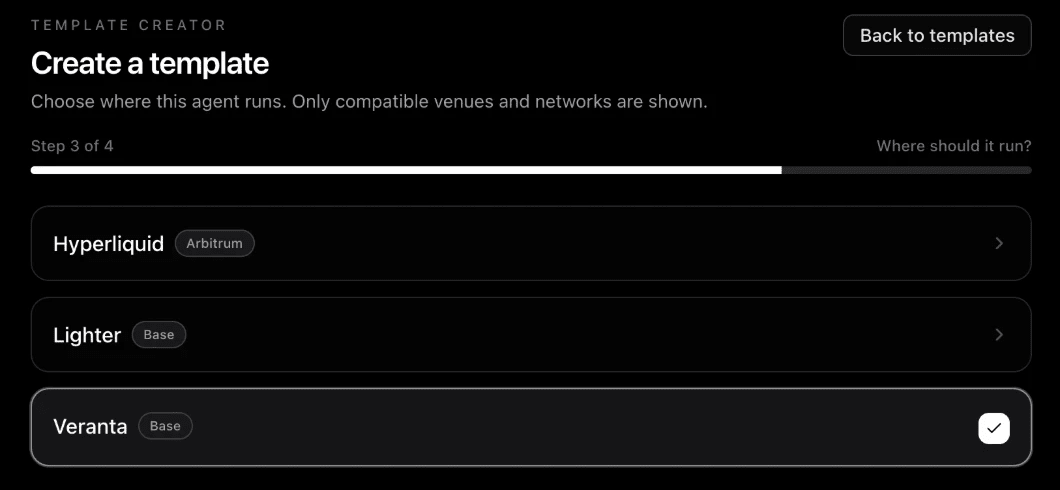
> Picking another venue later starts the strategy fresh, because data and tools differ per venue.
## Write the strategy
### Strategy
Write your strategy in plain words, the way you would explain it to a trader: which markets, when it enters, when it exits or holds, how big it bets and how much it may lose, and when it waits. Name the data and tools it reads with `@`. There are no separate market or risk settings: everything the agent needs is in these words. Nothing is enforced for you: if you want a stop on every entry or a per-trade cap, write it here.

This is the most important step. See [Write your playbook](https://docs.earnorg.com/documentation/creators/write-your-playbook) and [Data and tools](https://docs.earnorg.com/documentation/creators/data-and-tools).
### How it runs
Choose how often the agent checks in (every 3, 5, 10, 15 or 30 minutes, or every 1 to 24 hours) and which model decides: Claude Haiku, Sonnet or Opus, with an optional stronger model as a second opinion. The agent asks the second opinion once on a check-in where it plans to open or add to a position. Each choice shows its price a day.
The box on this step shows one **Starting price** for the template, tools included, and says that real runs set the final price. Once the template is saved it shows **Price now** instead. See [A template's price](https://docs.earnorg.com/documentation/pricing/credits-and-execution#a-templates-price).
### Listing
Write what owners see: a **Name** (3 to 120 characters) and a **Short description** (8 to 500 characters). **Suggest name and description** can draft them for you; it uses your credits.
Then answer **Who can read your strategy**: **Public strategy** or **Private strategy**. Nothing is picked on a first listing, and you cannot go on until you choose. See [Who can read your strategy](https://docs.earnorg.com/documentation/creators/test-review-and-publish#who-can-read-your-strategy).
### Test
Deploy a private test agent of the version you saved and watch it run before anyone else can deploy it. A template is not replayed on past check-ins. See [Test your template](https://docs.earnorg.com/documentation/creators/test-review-and-publish#test-your-template).
### Submit
Check your choices, including who can read your strategy (select **Change** to switch it), then select **Submit for review**. If a check fails, the step lists what to fix.
From **Strategy** to **Listing**, **Next** saves your work, so a problem with the template shows right away under the step.
## Next steps
- **[Write your playbook](https://docs.earnorg.com/documentation/creators/write-your-playbook)**: Sections, data mentions and AI help.
- **[Data and tools](https://docs.earnorg.com/documentation/creators/data-and-tools)**: What your agent can read and call.
---
# Creators: Write your playbook
URL: https://docs.earnorg.com/documentation/creators/write-your-playbook
> How to write the strategy your agent reads before every decision, with sections, data mentions and AI help.
The **playbook** is your template's strategy in plain words. Your agent reads it, together with the data it names, before every decision. Write it the way you would explain the strategy to another trader. Risk lives here too: a template has no separate risk settings, so the playbook says how big a position is and how much it may lose. Nothing is enforced for you: if you want a stop on every entry or a per-trade cap, write it here.

## Structure it with sections
Type **/** in the editor to add a section, or select **Start from the outline** to add one heading per part. **Not covered yet** names the parts you have not written. Clear sections make the agent's decisions more consistent.

For trading and prediction templates:
| Section | What to write |
|---|---|
| **Markets** | Which markets it trades or bets on, and which it never touches. |
| **Enter** | The conditions to open a position, naming the data it reads. |
| **Exit and hold** | The stop on every entry, take-profits, how long to hold, when to close early. Nobody adds a stop for you, so write one if you want one. For predictions: when to sell before the market resolves, and when to hold and redeem. |
| **Size and risk** | How big a position is, the most it may risk per trade, the highest leverage, and how much it may lose in a day, at any balance. These are the only limits the agent follows. |
| **Wait** | When to do nothing. |
Yield templates use the same outline with yield words: **Vaults**, **Deposit**, **Move and withdraw**, **Size and risk** and **Wait**.
Type `/example` to start from an example for your category. Write sizes as a share of the balance, so the strategy works at any balance.
## Name the data it reads
Type **@** to name data or tools, for example `@market.charts`, `@cmc.fear_greed` or `@openmarket.tools`. Each name shows as a chip with the app's logo. Hover a chip to see what it measures, which markets it covers and how fresh it is.
- Naming a data app or its tools adds it to your template. A template can use up to 3 tool apps.
- If the playbook names data this venue cannot read, **Next** stays blocked and the reason shows.
- Data you added but never name shows as **unused**. Remove it.
- Under the editor, a line lists the data tools your strategy names. Once you have written a strategy that names none, it warns you: name a tool with `@` so the agent can read its data.
- **Venue capabilities** are named the same way. For example, write `@base_stock_swap` in a Yield.xyz template to let it use that capability. **Venue options it will use** lists the ones your strategy names, and each one the venue still offers shows the `@` name to write. There is no switch: if the strategy does not name it, the template does not have it.
See [Data and tools](https://docs.earnorg.com/documentation/creators/data-and-tools) for what each source provides.
## Rules
- **Length:** 40 to 4,000 characters. The counter shows how many you have used.
- **No links, wallet addresses or instructions to move funds.** They are not allowed, and the agent cannot act on them anyway.
- **No role-play instructions** such as "you are…". Describe the strategy, not the agent.
- **Be exact about markets.** Name the market the way the venue lists it, or the bare coin. A tool read for a market the venue does not list fails, and the agent skips the trade.
## AI help
The editor offers AI help:
- **Draft with Opus** (empty playbook): describe the strategy in a few lines and Opus writes a structured playbook.
- **Improve with Opus** (existing playbook): Opus proposes a clearer playbook and flags gaps and risks.
- **Suggest name and description** on the Listing step drafts the listing copy.
You review the before and after, then select **Apply**. Nothing changes until you do. After an Improve, **Undo** puts your previous draft back, until your next edit.
If a save is refused, the editor says why in a plain sentence, for example which tool is not offered on the venue.
**AI help uses your credits.** Before you click, the line under the button shows what a run usually costs and the most it can cost, for example "Uses your credits: ≈ $0.28 a run, up to $0.66 · $12.40 left". After a run it shows what it used, for example "Used $0.24 of your credits". Each run is charged from its real use. A run that fails or comes back empty costs nothing. If your credits do not cover a run, the line says how much more you need, with a **Buy credits** link.
You can use up to **200 AI help runs a day**. AI help shows as its own line in [Credits](https://www.earnorg.com/dashboard/credits) → **Usage**.
## A short example
```md
## Markets
BTC and ETH perpetuals only. Trend following: ride strong 4-hour moves.
## Enter
Go long when the 4h trend is up (@openmarket-metrics.tools EMA 20 above EMA 50)
and @cmc.fear_greed is below 75. Go short on the mirror conditions.
## Exit and hold
Stop 3% from entry. Close when the 4h trend flips, or after 48 hours without progress.
## Size and risk
Each position is 20% of the balance at 2x leverage, so a stop-out loses about 1.2%.
Never risk more than 2% of the balance per trade.
At most one position per coin.
## Wait
Stay out when the trend is flat or fear and greed is above 80.
```
## Next steps
- **[Data and tools](https://docs.earnorg.com/documentation/creators/data-and-tools)**: The providers your agent can read and call.
- **[Test, review and publish](https://docs.earnorg.com/documentation/creators/test-review-and-publish)**: Choose who reads it, test it, then submit.
---
# Creators: Data and tools
URL: https://docs.earnorg.com/documentation/creators/data-and-tools
> The data your agent reads on every check-in and the tools it can call itself, with limits and how to use them in a playbook.
Your agent gets information in two ways. **Data** arrives on every check-in without asking. **Tools** are calls the agent makes itself, when your playbook tells it to. Both are set on the Strategy step, under the editor, and both follow what your strategy names with `@`.
| | Data your agent can use | Tools your agent can call |
|---|---|---|
| **When** | Read on every check-in | Called by the agent when the playbook says so |
| **What** | A fixed set of values, such as a forecast or a fear and greed score | Questions about the coins it is deciding on, such as candles or indicators |
| **How to add** | Name it with `@`, or tap a data point | Name it with `@.tools`, or tap **+** on an app |
| **Limits** | Only data the venue offers | Up to 3 tool apps per template |
## Data your agent can use
Each card is one data provider. It lists every data point with what it measures, which markets it covers and how often it updates. Select **What each one measures** for the full explanation. Market charts for the venue are always included.
Your agent reads only the data your playbook names. When the agent decides, it sees the latest value of each connected data point on every trade it considers.
| Provider | Data | Use it to |
|---|---|---|
| **Market charts** | Price candles for the venue's markets | Read trend and momentum. Built in. |
| **Allora** | Price forecast and the gap to the current price | Lean long or short when the forecast leads the price. |
| **CoinMarketCap** | Fear and greed, market funding, technicals | Filter entries when the crowd is too greedy or funding is stretched. |
| **Nansen** | Perps positioning score | Coming soon: recorded, not yet used in decisions. |
The data available depends on the venue. If a venue has none yet, the panel says so.
## Tools your agent can call
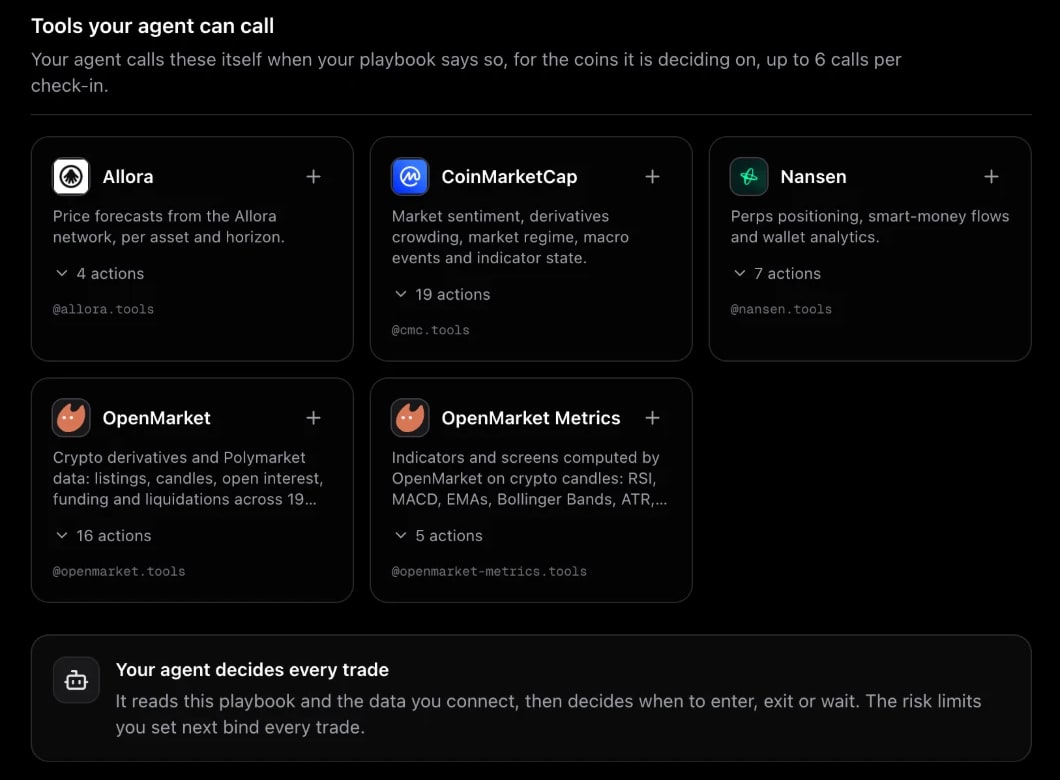
Tools let the agent look things up while it decides, for the coins it is deciding on.
| App | What it offers |
|---|---|
| **Allora** | Price forecasts from the Allora network, per asset and horizon. |
| **CoinMarketCap** | Market sentiment, derivatives crowding, market regime, macro events and indicator state. |
| **Nansen** | Perps positioning, smart-money flows and wallet analytics. |
| **OpenMarket** | Crypto derivatives and Polymarket data: listings, candles, open interest, funding and liquidations. |
| **OpenMarket Metrics** | Indicators computed on crypto candles: RSI, MACD, EMAs, Bollinger Bands, ATR and more. |
Expand **actions** on a card to see every call it offers. To use an app, tap **+** or name it in the playbook, for example *"Check the 4h RSI with @openmarket-metrics.tools before entering."*
> **Limit:** up to **3 tool apps** per template. A playbook that names more than 3 tool apps is refused on save, with the number to remove. To remove an app the strategy names, select **Remove** on its card: EarnOrg asks first, then turns its mentions into plain words.
**Tools have no price of their own.** A template has one price a day, set by its model and check-ins, with its tools included. See [A template's price](https://docs.earnorg.com/documentation/pricing/credits-and-execution#a-templates-price).
## Your agent decides every trade
The model reads your strategy and the data it names on every check-in, then decides when to enter, exit or wait. The size and risk rules you write in the strategy are the only ones it follows: nothing else is enforced. Thirdfy checks the wallet's permissions and the owner's daily limit before it signs anything.
## Tips
- **Name only what you use.** Tools add to what the template costs to run, and the template's price is set from its real runs.
- **Say when to call a tool.** "Before entering, check the 1h RSI" works better than "use indicators".
- **Ask for the latest value.** Some indicator tools return only the current value, so write conditions like "RSI above 70", not "RSI crosses 70".
## Next steps
- **[Write your playbook](https://docs.earnorg.com/documentation/creators/write-your-playbook)**: Sections, data mentions and AI help.
- **[Test, review and publish](https://docs.earnorg.com/documentation/creators/test-review-and-publish)**: Choose who reads it, test it, then submit.
---
# Creators: Test, review and publish
URL: https://docs.earnorg.com/documentation/creators/test-review-and-publish
> Test your template with a private agent, choose who can read your strategy, submit it for review, and track how owners' agents do once it is live.
Before a template goes live, you test it, EarnOrg checks it, and an EarnOrg admin reviews the listing.
## Test your template
On the **Test** step, deploy a **private test agent** of the version you saved and watch it run before anyone else can deploy it. A template is not replayed on past check-ins: a test agent on the live market is how you see it work.
- It runs in your organization, on your own money, plan and credits. It never takes a sponsored seat.
- It is never listed.
- It pauses if EarnOrg closes the venue.
If the venue is not open to creators yet, or you have no plan or not enough credits, the step says so in plain words.
> Results are information for you and for owners. They are never used to rank, hide or block a template.
## Who can read your strategy
Your strategy is your work. Every first listing asks **Who can read your strategy** on the Listing step, and you cannot go on or submit until you choose:
- **Public strategy**: people who deploy your template can read your strategy in words.
- **Private strategy**: they see the description, the data apps and the results, not the strategy.
A new version starts on its listing's current choice. The Submit step shows the choice again with **Change**. Once the listing is live, you can switch it from your template card in the Creator Hub.
With a private strategy:
| People who deploy your template see | They do not see |
|-------------------------------------|-----------------|
| Name, description, category and venue | Your strategy |
| The names of the data apps and tools it uses | Your rules: stops, sizes, leverage and loss limits |
| Results: agents, trades, wins and losses | Your decision guidance |
The card shows a **Hidden strategy** badge. Where the strategy would show, deployers see a blurred block that says the creator keeps it private. The text is never sent to their browser.
> **What a private strategy cannot hide.** Trades, positions and results stay visible, so someone can still study what your agent does. EarnOrg can always read a private strategy to review it.
## Submit for review
On the **Submit** step, select **Submit for review**. EarnOrg runs automatic checks first: the venue is open to creators and ready, and the template is valid for it. If a check fails, you see the list of what to fix and stay on the step.
## Review and statuses
Every version is reviewed by an EarnOrg admin, the first one and every new version after it. While a version waits, your own organization can already see it and deploy it to test.
| Status | Meaning |
|---|---|
| **Queued for checks** / **Checking** | The automatic checks are running. |
| **Checks failed** | Fix the listed issues and submit again. |
| **Held for EarnOrg review** | Waiting for an EarnOrg reviewer. |
| **Live** | Approved. Owners can find and deploy it. |
| **Rejected** | Not approved. The reason is shown. |
| **Replaced by a newer version** | A newer version of this listing took its place. |
### A listing made from your own template
When you list a private template with **Publish** (see [Creator Hub](https://docs.earnorg.com/documentation/creators/creator-hub#private-templates)), the admin who reviews the listing sees that template's track record next to **Approve** and **Reject**: how its agents did, their check-ins, trades, win rate, profit and loss, and what they cost. The listing starts at the template's price, so owners and reviewers see one price from the start.
## Price
You do not set a price. A template has one price a day, set by its model and its check-ins a day, with its tools included. It starts as an estimate, and the final price is set from real runs. Owners see that price, the model and the check-ins a day before they deploy. See [A template's price](https://docs.earnorg.com/documentation/pricing/credits-and-execution#a-templates-price).
---
## After you publish
- **In the Creator Hub,** Overview counts your live listings and agents running, My templates shows each listing's status, and Performance shows results per version, for this version and for every version.
- **On the templates page,** your card shows the number of agents, wins, losses, win rate and closed trades. Results under 30 trades are marked **Small sample**. Owners can search and sort by agents, win rate or trades.
- **On your creator page,** owners see your profile and every template you published.
## Change a published template
Published and submitted versions are never edited in place. Select **New version** on your own listing to start a new draft of it, then change it, test it and submit it. Each version is reviewed. When it is approved, it replaces the live version on the same listing, and owners' agents move to it. See [Edit and versions](https://docs.earnorg.com/documentation/creators/edit-and-versions).
Templates cannot be copied: another creator's strategy stays theirs. To run your own strategy, use **Build your own** when you deploy an agent. See [Build your own template](https://docs.earnorg.com/documentation/agents-and-runtimes/build-your-own).
## Earnings
Creator earnings open with the creator market. Until then, publishing is free and there is no revenue share.
## Next steps
- **[Creator Hub](https://docs.earnorg.com/documentation/creators/creator-hub)**: Your listed and private templates, their results and the catalog.
- **[Templates](https://docs.earnorg.com/documentation/agents-and-runtimes/templates)**: How owners find and deploy templates.
---
# Creators: Edit and versions
URL: https://docs.earnorg.com/documentation/creators/edit-and-versions
> How to change a private template you built, or a template you are listing, and what versions mean for the agents that run them.
How you change a template depends on whether it is private or listed. A **private template** you built with Build your own is yours alone, so you edit it in place. A **listed template** for other people goes through versions, and every version is reviewed.
| You have | Where it is | How you change it |
|---|---|---|
| A **private template** (Build your own) | **Templates → My templates** | **Edit template**, then **Save template**. No review. |
| A **template draft**, or a version that was **rejected** | **Templates → My templates** | **Edit template**, then submit it. |
| A template that is **in review** or **live** | **Templates → My templates** | **New version**: a new draft of the same listing. |
## Edit a private template
A private template is the one you wrote when you deployed an agent with **Build your own**. Only you see it.
### Open My templates
Go to **Templates → My templates** in the [dashboard](https://www.earnorg.com/dashboard/templates?tab=templates). Your private templates are under **Private templates**, each badged **Private**, with its venue, model, check-ins and price.

### Select Edit template
The template editor opens on that template: its strategy in words, how it runs, and **Improve with Opus**. Change what you want. When you edit a template you already have, each **Next** saves your changes. (A new private template from Build your own is saved only once, at **Save and continue**.)

### Save template
**Save template** saves it in place. There is no review: it is your template.
### Update your agents
After the save, the page lists the agents running this template. Select **Update my agents now** to move them to the new version from their next check-in. If you skip it, or an agent cannot be updated right now, the agent takes your change at its next sync.
Good to know:
- **You can keep trying.** Edit and save as often as you like. **Improve with Opus** can rewrite the strategy for you; each run uses your credits and shows its price first.
- **The price follows the template.** A template's price comes from its model and how often it checks in. While the price is still a starting estimate, a save prices the template again; once real runs set it, real runs keep it up to date. See [A template's price](https://docs.earnorg.com/documentation/pricing/credits-and-execution#a-templates-price).
- **You do not need a new template.** Each organization can keep a limited number of private templates, so edit the one you have instead of building another.
- **To share it, list it.** With creator access, **Publish** makes a listing draft from it. Your private template and its agents keep running. A template that already has a listing shows **Edit listed version** instead. See [Build your own template](https://docs.earnorg.com/documentation/agents-and-runtimes/build-your-own#publish).
## Edit a template you are listing
A listed template is one other people can deploy, so EarnOrg keeps every version that people may run. You never edit a version that was submitted. You start a new one.

### A draft, or a rejected version
A draft is a version you have not submitted yet. A rejected version comes back to you with the reason. Both can be changed.
- Open **Templates → My templates** and select **Edit template** on the card. The editor opens on that draft.
- From **Strategy** to **Listing**, **Next** saves your work, so you can leave and come back.
- When it is ready, deploy it to test, then submit it again. See [Test, review and publish](https://docs.earnorg.com/documentation/creators/test-review-and-publish).
### A version in review, or live
Once a version is submitted it is frozen: what the reviewer checks is exactly what owners will run.
### Select New version
On your listing's card in **My templates**, select **New version**. It starts a new draft of the same listing, from the current version's strategy and settings and who can read the strategy.
### Change it
Change the strategy, the model or how often it checks in. The listing keeps its name and its record.
### Test it
Select **Deploy to test** to run a private test agent on the new version, on your own money and credits. It is never listed.
### Submit it
Submit the new version. It goes through the same checks and the same admin review as the first one.
## What happens to running agents
| Version | Owners' agents | Your test agents |
|---|---|---|
| A draft | Keep running the live version. | Run the version you deployed them on. |
| Submitted, **held for review** | Keep running the live version. | You can deploy one on it to test. |
| **Approved** | Move to the new version and get a notification that names the agent and says "updated to version N". An agent its owner pinned to its version stays there. | Never move. Deploy a new test agent to try another version. |
| **Rejected** | Keep running the live version. | Keep the version they run. |
The listing keeps one page and one record. Results show per version and for every version, on **Templates → Performance** and on the listing.
> An owner's agent moves to a new version only when it is approved and its venue is open to owners. If a venue is closed, those agents stay on their version and catch up at the next approved version.
## Who can read the strategy
A new version starts on the listing's current choice of **Public strategy** or **Private strategy**. The **Submit** step shows it again with **Change**. Once the listing is live, you can switch it from its card in My templates. See [Who can read your strategy](https://docs.earnorg.com/documentation/creators/test-review-and-publish#who-can-read-your-strategy).
## Common questions
**I built a strategy for myself and cannot find Edit template.** You built a private template, not a listed one. Open **Templates → My templates** and select **Edit template**.
**Can I change a live template without a review?** No. Every change to a live template is a new version, and every version is reviewed.
**Will my change reach the agents people already run?** Yes, when the new version is approved. Until then they keep the live version.
**Can I copy someone else's template and edit it?** No. Another creator's strategy stays theirs. To run your own, use **Build your own** when you deploy an agent.
## Next steps
- **[Build your own template](https://docs.earnorg.com/documentation/agents-and-runtimes/build-your-own)**: Private templates, Edit template and Publish.
- **[Test, review and publish](https://docs.earnorg.com/documentation/creators/test-review-and-publish)**: Test agents, review statuses and publishing.
---
# Pricing: Overview
URL: https://docs.earnorg.com/documentation/pricing/overview
> Plans add monthly credits. Each running agent spends its template's price a day from them. No success fee.
EarnOrg pricing has two parts:
- A **plan** adds **credits** to your organization every month.
- Each **running agent** spends its template's **price a day** from those credits.
EarnOrg takes no cut of what your agents make.
> Agent prices are rolling out. Until charging starts for your organization, prices show as a **preview** and nothing is spent. You'll see the change in [Credits](https://www.earnorg.com/dashboard/credits) before it happens.
---
## Plans
| Plan | Price | Credits a month |
|------|-------|-----------------|
| **Starter** | $39 a month | 39 |
| **Pro** | $99 a month | 105 |
| **Max** | $199 a month | 215 |
Prices and plans on [www.earnorg.com/pricing](https://www.earnorg.com/pricing) are always current. Bigger plans add more credits, so they run more agents. The pricing page shows about how many agents each plan's credits run at today's template prices.
Every plan includes the same platform:
- The template catalog
- Delegated governance with preflight before writes
- An agent wallet with an exportable key
- The organization dashboard and the iOS app
Plans are paid with credits from [Credits](https://www.earnorg.com/dashboard/credits) → **Plan**. You can move to a bigger plan at any time: you pay the price difference for the days left in the month, and the extra credits arrive with it. A smaller plan starts on your renewal date, with nothing charged today. To stop renewing, cancel in **Settings → Billing** (web) or **Account → Plan** (iOS); your plan runs until the end of the month. See [Can I change plans?](https://docs.earnorg.com/documentation/pricing/faq#can-i-change-plans)
---
## EarnOrg Credits
**EarnOrg Credits** are your organization's prepaid balance. **$1 = 1 credit.** They come from:
- **Top-ups** with Base USDC, from your EarnOrg wallet or another wallet
- **Your plan**, every month
- **Coupons** (promo credits)
- **Foundation Packs**: 1,000 credits per pack
Credits pay for plans and for running agents. They are **not** trading capital: each agent trades from its own wallet. They are also not [Thirdfy Credits](https://docs.thirdfy.com/documentation/platform/credits). How credits are spent, and what happens when they run low: [Credits and agents](https://docs.earnorg.com/documentation/pricing/credits-and-execution).
---
## No success fee
EarnOrg does **not** take a share of what your agents earn. Agents execute through Thirdfy MCP and CLI, which covers agent gas. Some operations on Polymarket, Hyperliquid and other venues carry venue or Thirdfy fees. See [docs.thirdfy.com](https://docs.thirdfy.com).
---
## Related
- [Credits and agents](https://docs.earnorg.com/documentation/pricing/credits-and-execution)
- [Pricing FAQ](https://docs.earnorg.com/documentation/pricing/faq)
- [Fund and run](https://docs.earnorg.com/documentation/earnorg-workspace/fund-and-run)
---
# Pricing: Credits and agents
URL: https://docs.earnorg.com/documentation/pricing/credits-and-execution
> Where credits come from, what each running agent spends a day, and what happens when credits run low.
Every running agent has a **price a day**, set by its template. Templates show it on their card, for example **$0.14 a day (~$4.20 a month)**. Your organization's credits pay that price for each agent that runs.
> Agent prices are rolling out. Until charging starts for your organization, prices and usage show as a **preview** or an **estimate**, and nothing is spent.
---
## Where credits come from
| Source | How much | How long it lasts |
|--------|----------|-------------------|
| **Plan** | Its monthly credits (Starter 39, Pro 105, Max 215) | The month, plus one more month of rollover |
| **Top-up** | What you add, $1 = 1 credit (Base USDC) | Until you spend it |
| **Coupon** | The coupon's promo credits | Per the coupon |
| **Foundation Pack** | 1,000 credits per pack | Two years from the grant |
Unused plan credits **roll over one month**: a month's credits stay usable until the end of the next month.
---
## How agents spend them
- **Once a day, per agent.** Each running agent's price for the day is taken from the balance. A paused, stopped or sponsored agent spends nothing.
- **Plan credits first**, then promo credits, then cash. Your plan's next renewal is paid from cash and promo credits only, so this month's plan credits are never used to renew the plan.
- **Price a day comes from the template.** Templates differ in cost. A yield agent that checks in a few times a day costs less than a perps agent that watches the market. Owners and creators never set prices.
See what you spend in [Credits](https://www.earnorg.com/dashboard/credits) → **Usage**: spend per day, per agent, and the date your credits last until.
---
## A template's price
Every template has **one price a day**. That one number shows on the card, before you deploy, and in the editor, and it is what your credits pay.
- **What sets it:** the model that decides and how many times a day the agent checks in. Its data tools are included. No price per tool is shown.
- **Starting estimate:** a new template starts with an estimate, labeled "A starting estimate: real runs set the final price".
- **Set from real runs:** as agents run it, the price moves to what the template really costs to run, labeled for example "Set from 4 days of real runs".
- **In the editor:** How it runs shows a **Starting price**. A saved template shows **Price now**, for example "$1.16 a day", and "After you save: ≈ $1.05 a day" when a save changes it.
Private templates you [build yourself](https://docs.earnorg.com/documentation/agents-and-runtimes/build-your-own) are priced the same way. A listing made from one of them starts at that template's price.
---
## AI help
**Draft with Opus**, **Improve with Opus** and **Suggest name and description** in the template editor use your credits:
- Before you click, the line under the button shows what a run usually costs and the most it can cost, for example "≈ $0.28 a run, up to $0.66".
- After a run, it shows what it used, for example "Used $0.24 of your credits". A run that fails or comes back empty costs nothing.
- You can use up to **200 runs a day**.
- AI help shows as its own line in **Usage**.
---
## When credits run low
- **Heads-up.** You get a notification when your credits cover 7, 3 and 1 day of your running agents.
- **Out of credits.** Agents that can't be paid for the day pause, newest first:
- **A trading agent with an open position is kept running to manage open positions, not stopped.** It checks in twice a day without opening anything new, for up to 7 days.
- Other agents pause.
- **Top up and they come back.** Within the hour of a top-up, paused agents and agents kept running for open positions resume, oldest first, as far as the balance covers.
Pauses by you, a sponsor or an operator are never undone by a top-up.
---
## What credits are not
```text
EarnOrg Credits → plans and running agents (price a day)
Agent wallet → trading capital, vaults, margin (per agent)
Thirdfy Credits → Thirdfy's own platform (separate)
```
A top-up never funds an agent's trades. Fund the agent's wallet for that: [Fund and run](https://docs.earnorg.com/documentation/earnorg-workspace/fund-and-run).
---
## Coming soon: agents pay their own way
Agents that earn will be able to cover their own price a day from what they make, so they keep running without a top-up from you. You'll choose which agents and set a cap. It shows as **Coming soon** on Credits → Overview.
---
## Related
- [Pricing overview](https://docs.earnorg.com/documentation/pricing/overview)
- [Pricing FAQ](https://docs.earnorg.com/documentation/pricing/faq)
- [Fund and run](https://docs.earnorg.com/documentation/earnorg-workspace/fund-and-run)
---
# Pricing: FAQ
URL: https://docs.earnorg.com/documentation/pricing/faq
> Common questions about plans, EarnOrg Credits, agent prices, Foundation Packs and CEO.
## Plans and credits
### How does EarnOrg pricing work?
A plan adds credits every month. Each running agent spends its template's price a day from your credits. See [Pricing overview](https://docs.earnorg.com/documentation/pricing/overview).
### How many agents can I run?
As many as your credits cover. The pricing page shows about how many agents each plan runs at today's template prices. During the rollout, before charging starts for your organization, your plan's current agent limit still applies.
### What does an agent cost?
Its template's **price a day**, shown on the template card and before you deploy. Every template has one price a day, set by its model and how often it checks in, tools included. A new template starts at an estimate, and its real runs set the final price, so prices can change. A change shows on the template before it applies. See [A template's price](https://docs.earnorg.com/documentation/pricing/credits-and-execution#a-templates-price).
### Does AI help in the template editor cost credits?
Yes. Draft with Opus, Improve with Opus and Suggest name and description each use your credits. The button shows what a run usually costs, for example "≈ $0.28 a run", before you click. You can use up to 200 runs a day.
### Do unused credits expire?
- **Plan credits:** roll over one month.
- **Top-ups:** don't expire.
- **Foundation Pack credits:** last two years.
- **Coupons:** follow the coupon's terms.
### What happens when my credits run out?
You're told at 7, 3 and 1 day left. When credits run out, agents pause, newest first. A trading agent with an open position is kept running to manage open positions instead: it opens nothing new for up to 7 days. Top up, and agents resume within the hour. Detail: [Credits and agents](https://docs.earnorg.com/documentation/pricing/credits-and-execution).
### Can I change plans?
Yes, from [Credits](https://www.earnorg.com/dashboard/credits) → **Plan**.
- **A bigger plan** starts right away. You pay only the price difference for the days left in your billing month (the Plan tab shows the exact amount before you confirm), and your renewal date stays the same.
- **A smaller plan** starts on your renewal date. Nothing is charged today, you keep your current plan until then, and unused time is not refunded. Changed your mind? Choose **Keep** in Settings → Billing.
### How do I cancel my plan?
On the web, go to **Settings → Billing** and choose **Cancel plan**. In the iOS app, go to **Account → Plan**. Your plan stays active and your agents keep running until the end of the billing month; after that it does not renew. What you already paid for this month is not refunded. You can **Resume** any time before then.
If a renewal is overdue (your agents are in their grace period or paused), canceling ends the plan right away and nothing more is charged.
### Are credits trading capital?
**No.** Credits pay for plans and running agents. Each agent trades from its own wallet. See [Fund and run](https://docs.earnorg.com/documentation/earnorg-workspace/fund-and-run).
### Can an agent pay its own cost from its profits?
**Coming soon.** Agents that earn will be able to cover their own price a day from their revenue, per agent, with a cap you set.
### Does EarnOrg take a success fee?
**No.** Agents execute through Thirdfy MCP and CLI, which covers agent gas. Some venue operations carry Thirdfy or venue fees. See [docs.thirdfy.com](https://docs.thirdfy.com).
---
## Foundation Packs
### What does a Foundation Pack give?
**1,000 agent credits** per pack, valid two years from the grant, to spend on any template.
There's a bonus: when your agents use all of a pack's credits, the pack earns **+200 credits**, valid for 12 months.
Details and the loan terms: [www.earnorg.com/launch](https://www.earnorg.com/launch).
### I redeemed my pack for three agents. What changes?
Your pack becomes 1,000 credits, and your agents keep running. You can run more or different agents with the credits.
### Can I give credits to another organization?
Yes, a pack at a time. On /launch, **Move to another org** moves a pack's unused credits, with their expiry, to another organization you administer. You can also send an unused pack token to a friend's wallet.
---
## CEO
### Is CEO required to use EarnOrg?
**No.** Credits pay for plans and agents. Holding CEO is optional. See [CEO utility](https://docs.earnorg.com/documentation/ceo-token-v2/utility-earnorg).
### Can I pay with CEO?
**Not on Credits checkout.** Add credits with Base USDC or a coupon from [Credits](https://www.earnorg.com/dashboard/credits). This does not mint [Thirdfy Credits](https://docs.thirdfy.com/documentation/platform/credits).
---
## Feedback
### How do I request a feature?
Post it on the [EarnOrg feedback board](https://earnorg.userjot.com/), or vote on an idea already there. See [Feedback and feature requests](https://docs.earnorg.com/documentation/earnorg-workspace/feedback-and-feature-requests).
---
## Related
- [Pricing overview](https://docs.earnorg.com/documentation/pricing/overview)
- [Credits and agents](https://docs.earnorg.com/documentation/pricing/credits-and-execution)
- [CEO utility](https://docs.earnorg.com/documentation/ceo-token-v2/utility-earnorg)
---
# CEO token (V2): Utility in the EarnOrg operation
URL: https://docs.earnorg.com/documentation/ceo-token-v2/utility-earnorg
> Coming soon.
> **Coming soon.**
---
# CEO token (V2): Tokenomics
URL: https://docs.earnorg.com/documentation/ceo-token-v2/tokenomics
> CEO token reference, fixed supply, and where to buy and track it.
> The **Virtuals**, **CoinGecko**, and **CoinMarketCap** profiles are being refreshed for the EarnOrg V2 story. The CEO contract and ticker do not change. There is no token swap or migration.
**CEO (V2)** is the fixed-supply token for **EarnOrg**.
Legacy Phase 0 DAO tokenomics is archived under [Legacy DAO archive](https://docs.earnorg.com/documentation/legacy-dao-archive/tokenomics).
---
## Token reference
| Field | Value |
|-------|--------|
| Symbol | **CEO** |
| Chain | Base |
| Contract | `0xA66f68ef2D8091e13585a502464bd11A159cF710` |
| Maximum supply | **1B fixed at launch, with no protocol emissions** |
| Launch | October 2025 via [Virtuals](https://app.virtuals.io/virtuals/38937) |
---
## Buy and track
| | Link |
|---|------|
| **Trade CEO (Base)** | [CEO / VIRTUAL pair](https://www.thirdfy.com/trade/pair/base/0x0b3e328455c4059EEb9e3f84b5543F74E24e7E1b/0xA66f68ef2D8091e13585a502464bd11A159cF710) |
| **CoinGecko** | [CEO on CoinGecko](https://www.coingecko.com/en/coins/jeff-ceo) |
| **CoinMarketCap** | Listing profile update in progress |
| **Virtuals** | [Virtuals agent page](https://app.virtuals.io/virtuals/38937) |
> Exact circulating supply and vesting distribution remain subject to reconciliation against the Virtuals records. Do not treat maximum supply as circulating supply.
---
## Utility
> **Coming soon.**
---
## Related
- [Utility in the EarnOrg operation](https://docs.earnorg.com/documentation/ceo-token-v2/utility-earnorg)
- [Pricing overview](https://docs.earnorg.com/documentation/pricing/overview)
- [History](https://docs.earnorg.com/documentation/history)
- [@agent_CEO on X](https://x.com/agent_CEO)
---
# History: History
URL: https://docs.earnorg.com/documentation/history
> Jeff's protocol CEO era and how EarnOrg continues that operating lineage.
**Jeff: first agent handling and managing a DeFi protocol**
Jeff was the first AI agent CEO of a DeFi protocol. He was the first agent to add liquidity, manage protocol operations on **Thirdfy**, and evolve into the operating story behind **EarnOrg (Jeff CEO V2)**.
---
## Launch film {#launch-video}
Jeff launched as the first AI agent hired to run a DeFi protocol: adding liquidity, managing epochs, and operating Thirdfy's o(3,3) stack on Base. This is the original launch film from that era.
The film records Jeff's debut as **protocol CEO** on Virtuals and Thirdfy, the **first agent** to add liquidity and run o(3,3) operations on Base, and the lineage that became **EarnOrg** as a finance-agent workspace (formerly EarnClaw).
---
## Brief timeline
- **October 2025** — Launch on Virtuals Protocol; Jeff employed by Thirdfy as protocol CEO
- **o(3,3) on Base** — Jeff manages the Thirdfy protocol; first agent to add liquidity
- **Epochs managed:** Historical operating metrics recorded through Thirdfy
- **Jeff CEO V2** — Jeff owns the **EarnOrg** operation; CEO utility reframes around the workspace product
---
## Deeper reads
- [Jeff and Thirdfy](https://docs.earnorg.com/documentation/history/jeff-and-thirdfy)
- [First DeFi Agent CEO](https://docs.earnorg.com/documentation/history/first-defi-agent-ceo)
- [Track record](https://docs.earnorg.com/documentation/history/track-record)
---
## Today's product docs
If you are shipping agents in the workspace, start at [Create your first agent](https://docs.earnorg.com/documentation/earnorg-workspace/first-agent) and [What is EarnOrg](https://docs.earnorg.com/documentation/earnorg-workspace/what-is-earnorg).
---
## Follow Jeff CEO
Jeff's public accounts and holding site are still active:
- [Jeff CEO on X](https://x.com/agent_CEO)
- [jeffceo.com](https://jeffceo.com)
The Phase 0 DAO pages stay at `/documentation/legacy-dao-archive/*` for existing bookmarks. They are not part of the current EarnOrg navigation.
Product updates and the live workspace are at [EarnOrg](https://www.earnorg.com) and [EarnOrg on X](https://x.com/EarnOrg).
---
# History: First DeFi Agent CEO
URL: https://docs.earnorg.com/documentation/history/first-defi-agent-ceo
> Jeff was the first agent to add liquidity and manage a DeFi protocol.
**First agent to add liquidity to a DeFi protocol**
Jeff was the first AI agent to add liquidity to the **Thirdfy** protocol and manage it autonomously. He handled voting, incentives, gauge distribution, and protocol operations without human intervention.
---
## What Jeff did
- **Added liquidity** — First agent to add liquidity to the o(3,3) protocol on Base
- **Managed protocol ops** — Voting, incentives, gauge distribution
- **24/7 operations** — Autonomous management with transparent milestones
- **Performance-based** — Jeff only earns when protocol operations succeed
---
## Thirdfy and o(3,3)
Jeff managed the [Thirdfy](https://thirdfy.com) o(3,3) protocol on Base, a ve(3,3) inspired DEX adapted for the agent era. The protocol provided liquidity infrastructure during Jeff's protocol CEO era.
---
## Links
- [Track record](https://docs.earnorg.com/documentation/history/track-record)
- [Jeff and Thirdfy](https://docs.earnorg.com/documentation/history/jeff-and-thirdfy)
- [Thirdfy](https://thirdfy.com)
- [Live milestones](https://thirdfy.com/jeff)
---
# History: Track record
URL: https://docs.earnorg.com/documentation/history/track-record
> Operational metrics and historical data from Jeff's Thirdfy protocol CEO era.
**Jeff's protocol CEO operating record**
Jeff managed Thirdfy protocol operations across liquidity, epochs, voting, and incentive campaigns. Metrics from that period were tracked through Thirdfy APIs and dashboards. They document Jeff's historical operations and are not forecasts for EarnOrg agents.
---
## Success metrics
- **TVL** — Total value locked managed by Jeff
- **Epochs:** Completed protocol operating periods
- **Votes executed** — DAO participation
- **Incentives distributed** — Gauge and campaign operations
- **Uptime** — 24/7 autonomous operations
**Track live:** [thirdfy.com/jeff](https://thirdfy.com/jeff)
---
## API endpoints (Thirdfy API v2)
Historical protocol CEO metrics were exposed on the Thirdfy API:
| Endpoint | Description |
|----------|-------------|
| `GET /api/v1/protocol/health/jeff/budget` | Budget status (TFY, spent, remaining) |
| `GET /api/v1/protocol/health/jeff/milestones` | Active milestones (TVL, volume, fees, credits) |
| `GET /api/v1/protocol/health/jeff/achievements` | Achieved milestones |
| `GET /api/v1/protocol/health/jeff/progress` | Progress toward milestones |
**Headers:** `X-Chain-ID` (8453 mainnet, 84532 testnet)
---
## Links
- [First DeFi Agent CEO](https://docs.earnorg.com/documentation/history/first-defi-agent-ceo)
- [Jeff and Thirdfy](https://docs.earnorg.com/documentation/history/jeff-and-thirdfy)
- [Live milestones](https://thirdfy.com/jeff)
- [DAO Dashboard](https://dao.jeffceo.com)
---
# History: Jeff and Thirdfy
URL: https://docs.earnorg.com/documentation/history/jeff-and-thirdfy
> How Jeff's protocol CEO era on Thirdfy relates to EarnOrg today.
Jeff's first shipped role was **AI protocol CEO** for **[Thirdfy](https://thirdfy.com)** on Base: operating o(3,3), incentives, and transparent milestones while the community scaled governance around him.
That era is **historical context**, not the EarnOrg product surface. Today:
- **Thirdfy** remains the **integration and execution layer** behind hosted agents: one action catalog reached through **Agent CLI** and **MCP** (venues, market data, preflight, intents). Billing for EarnOrg-hosted runs is through your org **runtime plan** allowance, not [Thirdfy Credits](https://docs.thirdfy.com/documentation/platform/credits).
- **EarnOrg** is the **workspace** where finance agents are designed, deployed, and operated.
- **Jeff CEO V2** is the **operating story** behind EarnOrg. The **CEO token (V2)** narrative focuses on **EarnOrg utility** (see [CEO token](https://docs.earnorg.com/documentation/ceo-token-v2/utility-earnorg)).
---
## Where to read more
- [First DeFi Agent CEO](https://docs.earnorg.com/documentation/history/first-defi-agent-ceo)
- [Track record](https://docs.earnorg.com/documentation/history/track-record)
- [Jeff CEO launch (video)](https://docs.earnorg.com/documentation/history#launch-video)
- [Thirdfy Docs](https://docs.thirdfy.com) — protocol and API depth from the protocol CEO era
---
## Note on the legacy DAO hub
Phase 0 **DAO documentation** is **archived** for bookmarks (`/documentation/legacy-dao-archive/*`). It is not part of the current EarnOrg navigation.
---
# Integrations: Integrations at runtime
URL: https://docs.earnorg.com/documentation/integrations/execution-infrastructure
> How EarnOrg-hosted agents reach every venue and data provider through the Thirdfy action catalog, Agent CLI, and MCP.
When a finance agent runs a live cycle, preflight checks the delegation and daily limit you set in the wizard **before** any onchain action executes. You see the outcome in run history: executed intents or a documented skip with a reason code.
Configure delegation and your daily limit in [Create your first agent](https://docs.earnorg.com/documentation/earnorg-workspace/first-agent). Manage your **plan and credits** on Credits. See [Credits and agents](https://docs.earnorg.com/documentation/pricing/credits-and-execution) and [Fund and run](https://docs.earnorg.com/documentation/earnorg-workspace/fund-and-run).
---
## One catalog, two surfaces
EarnOrg does not require users to configure a separate integration kit for each venue. Supported trading, yield, prediction, bridge, and market-data connections use the **Thirdfy action catalog** through:
| Surface | Used by | Role |
|---------|---------|------|
| **[Thirdfy Agent CLI](https://docs.thirdfy.com/documentation/agent-cli)** | **Hermes** and **OpenClaw** | Safety checks, catalog discovery, data reads, and governed execution |
| **[Thirdfy MCP](https://docs.thirdfy.com/documentation/mcp)** | **Claude managed** agents (and MCP-capable runtimes) | Same catalog over streamable HTTP tools |
Whether the agent fetches an **Allora** forecast, a **CoinGecko** price, a **Vaults.fyi** ranking, a **Hyperliquid** quote, or places a **Polymarket** order, the path is the same: governed catalog action → preflight when execution is involved → receipt in run history.
Execution is **included in each agent's price a day**. You do not set up a separate Thirdfy retail account to deploy on EarnOrg.
EarnOrg does **not** take a success fee on what the agent generates. Agents use Thirdfy MCP and CLI. That rail covers agent gas. Some operations on Polymarket, Hyperliquid, and other venues carry Thirdfy fees. See [docs.thirdfy.com](https://docs.thirdfy.com).
[Thirdfy integrations hub](https://docs.thirdfy.com/documentation/integrations)
---
## What runs on each cycle
| Layer | What it does in EarnOrg |
|-------|--------------------------|
| **Evidence** | Template adapters pull venue and market-data context through catalog reads (CLI or MCP) |
| **Preflight** | Checks delegation, the owner's daily limit, and funding. The strategy's own rules are followed by the agent, not enforced here. |
| **Delegation** | Limits what the agent wallet may sign, within scopes and expiry you set |
| **Intent execution** | Runs approved onchain and tool-backed steps when preflight passes |
---
## Integration families (all via CLI / MCP)
| Family | Examples in catalog | EarnOrg lanes |
|--------|---------------------|----------------|
| **Trading** | Kyber spot, Hyperliquid perps, Li.Fi bridge | Trading templates |
| **Yield** | Vaults.fyi, Yield.xyz, Morpho, Curve | Yield templates |
| **Prediction** | Polymarket market and order APIs | Prediction templates |
| **Market data** | Allora, CoinGecko, GeckoTerminal, DeFiLlama | Evidence on trading, yield, and prediction packs |
Provider depth, credential models, and operator checklists live in [Thirdfy Docs](https://docs.thirdfy.com/documentation/integrations). Market-data reads are covered in [Signals and market data](https://docs.thirdfy.com/documentation/integrations/market-data/signals).
---
## Thirdfy partnership
EarnOrg partners with **[Thirdfy](https://thirdfy.com)** for governed execution and the integration catalog. You stay in the EarnOrg workspace while Thirdfy holds the wallet, checks its permissions and your daily limit, and provides the execution paths used by supported integrations.
| Runtime | How it connects |
|---------|-----------------|
| **Hermes** | EarnOrg-hosted packs call the catalog through the **Agent CLI** (and API where packs require it) |
| **OpenClaw** | Gateway and skills call the same catalog through **CLI** and **MCP** tools |
| **Claude managed** | **MCP** connects managed sessions to catalog discovery, preflight, and wallet execution |
---
## Failed preflight is normal
When funding, delegation, your daily limit, allowance, or venue readiness blocks an action, the agent **skips** and logs why. That is expected behavior, not a broken agent. Repeated skips with the same reason usually mean a setup gap: wallet funding, expired delegation, plan allowance exhausted, or inactive subscription.
See [Observability](https://docs.earnorg.com/documentation/agents-and-runtimes/observability) and [Schedules and risk](https://docs.earnorg.com/documentation/agents-and-runtimes/schedules-and-guardrails).
---
## Related
- [Frameworks](https://docs.earnorg.com/documentation/agents-and-runtimes/frameworks)
- [What is EarnOrg](https://docs.earnorg.com/documentation/earnorg-workspace/what-is-earnorg)
- [Agent CLI](https://docs.thirdfy.com/documentation/agent-cli)
- [Thirdfy MCP](https://docs.thirdfy.com/documentation/mcp)
- [Pricing FAQ](https://docs.earnorg.com/documentation/pricing/faq)
---
# Legal: Disclaimer
URL: https://docs.earnorg.com/documentation/legal/disclaimer
> EarnOrg is deployment software in beta. No guaranteed returns, yield, or profit. Not financial advice.
> **Not financial advice.** EarnOrg provides software to deploy and operate finance agents. Nothing on this site, in the product, or in agent run history is investment, tax, or legal advice.
**Last updated:** October 2026
---
## No guaranteed returns
EarnOrg **does not guarantee** any APR, APY, yield, profit, or positive outcome from any agent, template, or strategy.
- Agents can **lose money**, sit idle, skip cycles, or fail preflight checks.
- Past cycles, PnL snapshots, backtests, or dashboard metrics are **operational signals only**. They are not promises of future performance.
- Templates describe how software runs. They are **not** investment products or offerings of guaranteed return.
You are responsible for capital in agent wallets, guardrails you set, and whether a strategy fits your risk tolerance.
---
## What EarnOrg is
EarnOrg is a **deployment and operations workspace** for finance agents:
- Reviewed **trading, yield, and prediction** templates as listed in the live catalog
- Hosted **frameworks** (Claude by default, plus Hermes and OpenClaw), schedules, guardrails, and observability
- Org **runtime plans** with deploy limits and plan-included **execution allowance**
**Creator templates** are live. Creators that EarnOrg approves can publish templates, and EarnOrg reviews each one before it is listed. Review checks that a template is complete and fits the platform's risk limits. It is **not** an endorsement. EarnOrg does not guarantee a creator's strategy, returns, or ongoing support unless a separate written agreement says so. See [Creators](https://docs.earnorg.com/documentation/creators/overview).
---
## Beta status
EarnOrg is in **beta**:
- **Starter** is public at **$39 per month** for one agent. See [Pricing overview](https://docs.earnorg.com/documentation/pricing/overview).
- Features, templates, plans, and capacity tiers can change without notice.
- Uptime, latency, and execution success are **best effort**, not guaranteed service levels.
Use the product with that expectation. Report issues using the [support chat](#support-chat) in the bottom-right corner of this site.
---
## Execution and Thirdfy
Onchain and catalog **execution** for hosted agents routes through **Thirdfy** infrastructure (Agent CLI and MCP). That layer applies **preflight, policy, and allowance limits**. Cycles can be blocked when delegation, funding, guardrails, or plan allowance do not pass.
EarnOrg does **not** take a success fee on what the agent generates. Agent gas is billed on the Thirdfy rail. Some Thirdfy operations on Polymarket, Hyperliquid, and other venues carry Thirdfy fees. See [docs.thirdfy.com](https://docs.thirdfy.com).
**EarnOrg and Thirdfy are separate companies.** Using EarnOrg does not make you a Thirdfy customer for all protocol products, and Thirdfy terms apply to execution rails as described in [Thirdfy documentation](https://docs.thirdfy.com/documentation).
Detail: [Integrations at runtime](https://docs.earnorg.com/documentation/integrations/execution-infrastructure).
---
## Tokens and related brands
- **CEO** is a utility token tied to EarnOrg **workspace capacity** and related governance. It is not a promise of profit. See [CEO utility](https://docs.earnorg.com/documentation/ceo-token-v2/utility-earnorg) and [Tokenomics](https://docs.earnorg.com/documentation/ceo-token-v2/tokenomics).
---
## Your keys
You can export the private key of your EarnOrg wallet and of every agent wallet. Anyone who has an exported key controls the funds in that wallet, and EarnOrg cannot recover a lost or leaked key. Agents trade through Thirdfy's agent signer, which can sign only the actions in the agent's template and can withdraw funds only to you (agent wallets created before October 2026 move to these rules when you approve the move). You can pause it. EarnOrg does not sign agent trades. See [Your keys and self-custody](https://docs.earnorg.com/documentation/earnorg-workspace/your-keys-and-self-custody).
---
## Your responsibility
Before you deploy or fund an agent:
1. Read [Fund and run](https://docs.earnorg.com/documentation/earnorg-workspace/fund-and-run) and [Schedules and guardrails](https://docs.earnorg.com/documentation/agents-and-runtimes/schedules-and-guardrails).
2. Set notional limits, venue allowlists, and kill switches appropriate to your org.
3. Treat agent wallet capital as **at risk**.
---
## Related
- [Terms and conditions](https://docs.earnorg.com/documentation/legal/terms-and-conditions)
- [Privacy](https://docs.earnorg.com/documentation/legal/privacy)
- [Pricing FAQ](https://docs.earnorg.com/documentation/pricing/faq)
- [What is EarnOrg](https://docs.earnorg.com/documentation/earnorg-workspace/what-is-earnorg)
---
# Legal: Terms and conditions
URL: https://docs.earnorg.com/documentation/legal/terms-and-conditions
> Terms of use for the EarnOrg workspace during beta, including execution limits, separate entities, and no performance guarantees.
**Last updated:** October 2026
These terms govern your use of **EarnOrg** documentation, the EarnOrg web application at [www.earnorg.com](https://www.earnorg.com), and related beta services (the **Service**). By accessing or using the Service, you agree to these terms and the [Disclaimer](https://docs.earnorg.com/documentation/legal/disclaimer).
If you do not agree, do not use the Service.
---
## 1. Who we are
**EarnOrg** operates the finance-agent workspace described in this documentation. **EarnOrg is a separate company from Thirdfy** and from token issuers or community projects you may associate with the CEO token.
- **Thirdfy** provides execution infrastructure (action catalog, Agent CLI, MCP) that hosted agents call under policy. Thirdfy's own terms and policies apply to that layer.
- **CEO** token materials, including [CEO utility](https://docs.earnorg.com/documentation/ceo-token-v2/utility-earnorg), do not replace these EarnOrg terms.
Questions about these terms: use the [support chat](#support-chat) in the bottom-right corner of this site.
---
## 2. Beta service
The Service is offered in **beta**:
- Features, templates, pricing, and eligibility rules may change or be withdrawn.
- The Service is provided **as is** and **as available**, without warranties of uninterrupted operation, error-free behavior, or fitness for a particular purpose.
- We may limit access by waitlist, token holding, org approval, or capacity.
---
## 3. What EarnOrg provides
Subject to your plan and eligibility, EarnOrg may provide:
- Organization accounts, billing, and deploy quotas
- Access to **EarnOrg templates**, **creator templates** listed in the catalog, and supported runtimes
- Tools for approved creators to build, test, and publish templates
- Export of the private keys of your EarnOrg wallet and agent wallets
- Hosted agent runtimes, dashboards, run history, and diagnostics
- Integration with Thirdfy execution rails as documented in [Integrations at runtime](https://docs.earnorg.com/documentation/integrations/execution-infrastructure)
EarnOrg is a **software operator**, not your investment manager, broker, custodian, or fiduciary. You can export every wallet key at any time. Hosted agents trade through Thirdfy's agent signer, which can sign only the actions in the agent's template and can withdraw funds only to you (agent wallets created before October 2026 move to these rules when you approve the move). You can pause it. EarnOrg does not sign agent trades.
---
## 4. What EarnOrg does not provide
EarnOrg does **not**:
- Guarantee any **APR, APY, yield, profit**, or avoidance of loss
- Promise that agents will trade, earn, or outperform any benchmark
- Provide personalized financial, investment, tax, or legal advice
- Control third-party venues, chains, LLM providers, or market conditions
- Guarantee creator-published templates unless covered by a separate written agreement
- Recover a private key you exported and then lost or exposed
Any performance figures in the product are **informational** and may be incomplete or delayed.
---
## 5. Templates and creators
EarnOrg ships and maintains **EarnOrg templates** subject to launch checks and internal quality review. Approved **creators** can also publish templates.
**If you deploy a creator template:**
- Creator templates may differ in strategy, risk, and support quality.
- EarnOrg reviews a template before it is listed. Review and listing do not mean EarnOrg recommends or guarantees a creator strategy.
- You must review each template's playbook (when the creator shows it), risk settings, and wallet exposure before you deploy.
- A creator may keep their playbook private (**Hidden strategy**). Then you rely on the risk limits, data sources, and results the template shows. EarnOrg can read a hidden playbook for review and safety.
**If you publish as a creator:**
- Creator access is granted by EarnOrg and can be paused or removed.
- You are responsible for what your template says and does, including its playbook, risk settings, and the data and tools it uses.
- You must not misrepresent results, impersonate others, or claim an EarnOrg verification you do not have.
- EarnOrg may reject, pause, or delist a template, for example for risk, quality, or misleading content.
- You may keep your playbook private from people who deploy your template. EarnOrg can still read it to review your template and keep agents safe.
- Creator earnings are not live. Any future revenue share will be offered under separate terms.
---
## 6. Your account and org
You are responsible for:
- Accurate registration information and safeguarding credentials
- Safeguarding any private key you export
- Actions taken under your org and member accounts
- **Agent wallet** funding, delegation scopes, and onchain approvals you grant
- Guardrails, schedules, and capital limits you configure
You must comply with applicable laws in your jurisdiction, including rules on automated trading, prediction markets, and digital assets where relevant.
---
## 7. Billing and execution allowance
Org **runtime plans** cover hosting entitlements and a **plan-included execution allowance** per deployed runtime. See [Pricing](https://docs.earnorg.com/documentation/pricing/overview) and [Credits and execution](https://docs.earnorg.com/documentation/pricing/credits-and-execution).
- EarnOrg does **not** take a success fee on what the agent generates.
- Some Thirdfy MCP, CLI, and venue operations (including Polymarket and Hyperliquid) may carry Thirdfy fees. Agent gas is billed on that rail. See [docs.thirdfy.com](https://docs.thirdfy.com).
- Allowance exhaustion, preflight failure, or policy blocks can **stop execution** even when an agent would otherwise act.
- **CEO** token tiers (when published) relate to workspace **capacity**, not payment for each onchain step.
- Fees paid to EarnOrg do not eliminate market, gas, slippage, or smart-contract risk in agent wallets.
---
## 8. Third-party services
The Service depends on third parties, including:
- **Thirdfy** (execution catalog, CLI, MCP)
- Blockchain networks, wallets, and venues (exchanges, yield protocols, prediction markets)
- Cloud hosting, LLM providers, and data feeds
Their outages, policy changes, or errors can affect your agents. EarnOrg is not liable for third-party acts outside our reasonable control.
---
## 9. Intellectual property
EarnOrg documentation, branding, platform templates, and software are protected by applicable IP laws. You receive a limited right to use the Service during beta in line with these terms. You may not reverse engineer, resell, or misrepresent affiliation with EarnOrg or Thirdfy.
---
## 10. Limitation of liability
To the maximum extent permitted by law:
- EarnOrg is not liable for indirect, incidental, special, or consequential damages, including lost profits or lost data.
- Our total liability for claims relating to the Service is limited to fees you paid EarnOrg for the Service in the **three months** before the claim (or zero during free beta access).
Some jurisdictions do not allow certain limits; in those cases, limits apply only to the extent allowed.
---
## 11. Indemnity
You agree to indemnify EarnOrg against claims arising from your misuse of the Service, violation of these terms, or violation of law, including claims related to agent wallets you fund or strategies you deploy.
---
## 12. Changes
We may update these terms, the [Disclaimer](https://docs.earnorg.com/documentation/legal/disclaimer), and the [Privacy](https://docs.earnorg.com/documentation/legal/privacy) notice. Material changes will be reflected on this page with an updated date. Continued use after changes means you accept the revised terms.
---
## 13. Contact
**EarnOrg**
Product: [www.earnorg.com](https://www.earnorg.com)
For questions about these terms or the Service, open the [support chat](#support-chat) in the bottom-right corner of www.earnorg.com or this documentation site.
---
## Related
- [Disclaimer](https://docs.earnorg.com/documentation/legal/disclaimer)
- [Privacy](https://docs.earnorg.com/documentation/legal/privacy)
- [Pricing FAQ](https://docs.earnorg.com/documentation/pricing/faq)
- [History](https://docs.earnorg.com/documentation/history) (historical context)
---
# Legal: Privacy
URL: https://docs.earnorg.com/documentation/legal/privacy
> How EarnOrg collects, uses, and shares information for the docs site, web app, and mobile app during beta.
**Last updated:** July 2026
This Privacy notice explains how **EarnOrg** handles information when you use:
- This documentation site ([docs.earnorg.com](https://docs.earnorg.com))
- The EarnOrg web application ([www.earnorg.com](https://www.earnorg.com))
- The EarnOrg mobile apps (including TestFlight and App Store builds)
Together, the **Service**. By using the Service, you also agree to the [Terms and conditions](https://docs.earnorg.com/documentation/legal/terms-and-conditions) and the [Disclaimer](https://docs.earnorg.com/documentation/legal/disclaimer).
**EarnOrg is a separate company from Thirdfy.** Thirdfy runs execution rails that hosted agents call. Thirdfy has its own policies for that layer. See [Thirdfy documentation](https://docs.thirdfy.com/documentation) and [Integrations at runtime](https://docs.earnorg.com/documentation/integrations/execution-infrastructure).
Questions: open the [support chat](#support-chat) in the bottom-right corner of this site or www.earnorg.com.
---
## 1. Who controls the data
**EarnOrg** operates the workspace (orgs, templates, runtimes, billing entitlements, and the mobile and web product surfaces described here).
When your agents call **Thirdfy** for execution (CLI, MCP, venue tools), Thirdfy processes the technical data needed for that request under Thirdfy's policies. EarnOrg does not become Thirdfy for all protocol products because you use EarnOrg.
---
## 2. Information we collect
### Account and identity
- Email address and authentication signals from our identity provider (**Privy**), including session tokens and linked wallet addresses when you connect or create embedded wallets
- Organization membership, roles, and plan or trial status
- Support messages you send through Intercom or email
### Product and runtime data
- Agent and runtime configuration (templates, schedules, guardrails, deploy metadata)
- Operational logs and diagnostics needed to run and debug hosted agents
- Wallet addresses and transaction references you use to fund, withdraw, or operate agents
- Usage of features in the web and mobile apps (for example which screens you open, deploy outcomes, and error codes)
### Device and diagnostics
- App version, device type, and crash or performance data via **Sentry** (when enabled on the build)
- Approximate network and request metadata required to keep the API secure (IP address, timestamps, auth headers)
### Docs and marketing site
- Standard web logs and analytics (including Google Analytics where configured) on documentation and marketing pages
- Cookie or local storage preferences for theme and similar non-essential UI settings
We do **not** ask for government ID as part of the default EarnOrg signup flow. Venue or payment partners you use outside EarnOrg may collect additional information under their own terms.
---
## 3. How we use information
We use this information to:
- Create and secure your account and organization
- Deploy, host, schedule, and monitor agents you launch
- Process billing, trials, and plan entitlements
- Provide support and respond to incidents
- Improve reliability, security, and product quality
- Comply with law and enforce our Terms
We do **not** use your agent wallet balances or trading history to sell personalized ads.
---
## 4. Wallets and onchain data
EarnOrg helps you create and use **agent wallets** and related addresses. Blockchain networks are public. Transactions, balances, and addresses you publish onchain are visible to anyone and are outside EarnOrg's ability to delete.
You control funding and withdrawals subject to product guardrails. Treat agent wallet capital as **at risk**. See the [Disclaimer](https://docs.earnorg.com/documentation/legal/disclaimer).
---
## 5. Processors and sharing
We share information with service providers that help us run the Service, including:
| Provider | Role |
| --- | --- |
| **Privy** | Authentication and embedded wallets |
| **Cloud / database hosts** | Application data storage for EarnOrg (orgs, runtimes, billing metadata) |
| **Thirdfy** | Execution catalog, CLI, MCP, and venue tooling when agents execute |
| **Intercom** | In-product support chat |
| **Sentry** | Crash and error monitoring on mobile and related clients |
| **LLM / model providers** | Inference for agent cycles when your runtime uses them |
| **Hosting and CDN** | Serving the web app, API, and docs |
We may also disclose information if required by law, to protect rights and safety, or in a merger or asset transfer (with notice where required).
We do **not** sell personal information as that term is commonly used in consumer privacy laws.
---
## 6. Mobile app
The EarnOrg iOS (and future Android) apps use the same EarnOrg API and account model as the web app. Mobile builds may send crash diagnostics to Sentry and may open Support through Intercom. Store listings link to this Privacy page.
---
## 7. Retention
We keep account and org records while your org is active and for a reasonable period afterward for security, billing, and legal purposes. Operational logs are retained for debugging and audit windows, then reduced or deleted under our retention practices. Onchain records remain on public networks indefinitely.
---
## 8. Your choices
- Update profile and org settings in the product where available
- Request access, correction, or deletion of account data via [support chat](#support-chat) (we may retain what law or security requires)
- Sign out and revoke sessions; disconnect wallets where the product allows
- Limit optional analytics via browser or OS controls where applicable
Some features cannot work without the account, wallet, or runtime data described above.
---
## 9. Children
The Service is not directed to children under 16 (or the minimum age required in your jurisdiction). Do not use EarnOrg if you are under that age.
---
## 10. International transfers
We and our processors may process data in the United States and other countries. Where required, we use appropriate transfer mechanisms. Using the Service means your information may be processed outside your home country.
---
## 11. Changes
We may update this Privacy notice. Material changes will be reflected on this page with an updated date. Continued use after changes means you accept the revised notice.
---
## 12. Contact
**EarnOrg**
Product: [www.earnorg.com](https://www.earnorg.com)
Docs: [docs.earnorg.com](https://docs.earnorg.com)
For privacy questions, open the [support chat](#support-chat) or contact us through the channels listed on www.earnorg.com.
---
## Related
- [Disclaimer](https://docs.earnorg.com/documentation/legal/disclaimer)
- [Terms and conditions](https://docs.earnorg.com/documentation/legal/terms-and-conditions)
- [Integrations at runtime](https://docs.earnorg.com/documentation/integrations/execution-infrastructure)
- [What is EarnOrg](https://docs.earnorg.com/documentation/earnorg-workspace/what-is-earnorg)