

Data and tools
The data your agent reads on every check-in and the tools it can call itself, with limits and how to use them in a playbook.
Your agent gets information in two ways. Data arrives on every check-in without asking. Tools are calls the agent makes itself, when your playbook tells it to. Both are set on the Strategy step, under the editor.
| Data your agent can use | Tools your agent can call | |
|---|---|---|
| When | Read on every check-in | Called by the agent when the playbook says so |
| What | A fixed set of values, such as a forecast or a fear and greed score | Questions about the coins it is deciding on, such as candles or indicators |
| How to add | Tap a data point, or name it with @ | Tap + on an app, or name it with @<app>.tools |
| Limits | Only data the venue offers | Up to 3 tool apps per template, up to 6 calls per check-in |
Data your agent can use
Each card is one data provider. It lists every data point with what it measures, which markets it covers and how often it updates. Select What each one measures for the full explanation. Market charts for the venue are always included.
Your agent reads only the data your playbook names. When the agent decides, it sees the latest value of each connected data point on every trade it considers.
| Provider | Data | Use it to |
|---|---|---|
| Market charts | Price candles for the venue's markets | Read trend and momentum. Built in. |
| Allora | Price forecast and the gap to the current price | Lean long or short when the forecast leads the price. |
| CoinMarketCap | Fear and greed, market funding, technicals | Filter entries when the crowd is too greedy or funding is stretched. |
| Nansen | Perps positioning score | Coming soon: recorded, not yet used in decisions. |
The data available depends on the venue. If a venue has none yet, the panel says so.
Tools your agent can call
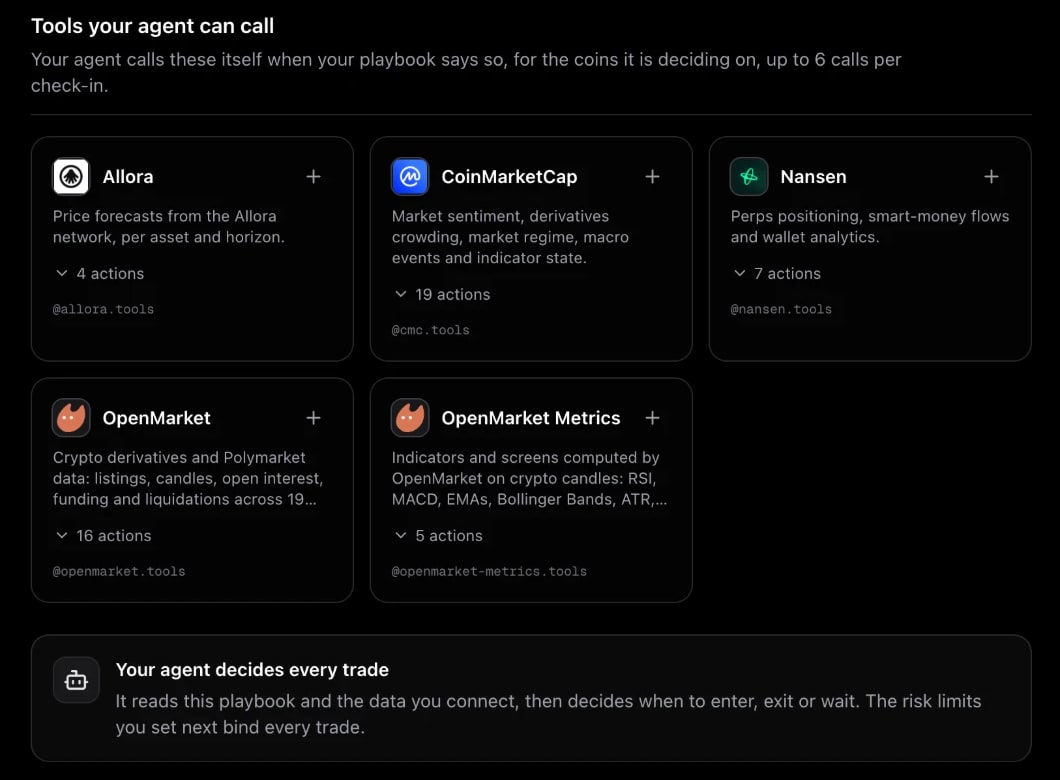
Tools let the agent look things up while it decides, for the coins it is deciding on.
| App | What it offers |
|---|---|
| Allora | Price forecasts from the Allora network, per asset and horizon. |
| CoinMarketCap | Market sentiment, derivatives crowding, market regime, macro events and indicator state. |
| Nansen | Perps positioning, smart-money flows and wallet analytics. |
| OpenMarket | Crypto derivatives and Polymarket data: listings, candles, open interest, funding and liquidations. |
| OpenMarket Metrics | Indicators computed on crypto candles: RSI, MACD, EMAs, Bollinger Bands, ATR and more. |
Expand actions on a card to see every call it offers. To use an app, tap + or name it in the playbook, for example "Check the 4h RSI with @openmarket-metrics.tools before entering."
Limits: up to 3 tool apps per template, and up to 6 tool calls per check-in. A playbook that names more than 3 tool apps is refused on save, with the number to remove.
Your agent decides every trade
New templates run at agent level. The agent reads your playbook and the data you connect, then decides when to enter, exit or wait. The risk limits you set on the Risk step bind every trade, and EarnOrg checks every action against them before it goes out.
Tips
- Name only what you use. Every connected data point costs a read on every check-in.
- Say when to call a tool. "Before entering, check the 1h RSI" works better than "use indicators".
- Ask for the latest value. Some indicator tools return only the current value, so write conditions like "RSI above 70", not "RSI crosses 70".